5 Best Receipt Scanners with OCR Software (November 2026)
The best receipt scanners with OCR software include the Doxie Pro for simple home and office filing, the Epson RapidReceipt RR-620W Wireless & USB High-Speed for high-volume receipt batches, and the Epson RapidReceipt RR-70W Compact Mobile Document Scanner for mobile receipt scanning.
On this page (4 sections)
The best receipt scanner with OCR software is Doxie Pro for most home and office users because it combines automatic duplex scanning, searchable PDFs and simple organization tools. Choose the Epson RapidReceipt RR-620W for high-volume batches, or the Epson RR-70W when portability matters more.
OCR changes a receipt from an image into searchable text. That means a faded shop name or a date buried in small print can be found later by typing a word, rather than opening file after file.
That search only helps if the scan itself is clear and complete. Good contrast, straight pages and a feeder that handles both sides in one pass give the software a cleaner image to read.
This roundup compares the recognition tools, feeder sizes, connection options and workflows that matter when you want a receipt scanner organizer rather than a pile of image files. It also looks at how each model sends files onward, because a perfect scan still needs a sensible destination.
For a home office, the daily questions are practical ones. How many receipts arrive at once, how often do you need to search them, and do you work from one desk or from several places.
A small feeder suits a few receipts a week and keeps the footprint compact. A larger feeder suits bookkeeping sessions where stopping to reload would break your concentration.
Connection choice shapes the habit as well. A wired scanner beside one computer can feel tidy and predictable, while wireless or network options help when files need to reach cloud folders or shared destinations.
Software matters just as much as hardware. Import screens, file naming, searchable PDFs and accounting links decide whether scanning ends with an organized record or with another folder to sort later.
We weigh those trade-offs for each scanner below, from setup and care to who each workflow suits best. Use the comparisons to match the scanner to your filing path, not just to its headline speed.
For broader printer and scanner advice, use our home printer buying guide.
Our picks at a glance
-
1
-
2
 Best for high-volume receipt batches
Epson RapidReceipt RR-620W Wireless & USB High-Speed
9.6/10 our score
See it on Amazon -
3
 Best for mobile receipt scanning
Epson RapidReceipt RR-70W Compact Mobile Document Scanner
9.0/10 our score
See it on Amazon
- 4
 Check it
Canon imageFORMULA R40II Receipt Edition Office Document
Best for QuickBooks workflows - 5
 Check it
RICOH fi-8040 Office & Desktop Document
Best for networked office scanning
The best receipt scanners with OCR software
Doxie Pro is the best balanced choice for simple receipt filing, while the Epson RR-620W is better for larger batches. The RR-70W handles mobile work, Canon targets QuickBooks users and Ricoh fits offices that need network destinations.
Our score weighs specs, features and buyer feedback against the needs of people shopping for a receipt scanner with OCR software.
| Product | Best for | Scan speed | Size | Connection | Our score |
|---|---|---|---|---|---|
| Doxie Pro | simple home and office filing | Up to 22 pages per minute | 11.75 x 4 x 3 in; about 3 lb | USB | 9.7 |
| Epson RapidReceipt RR-620W Wireless & USB High-Speed | high-volume receipt batches | Up to 45 pages per minute | 6.7 x 11.6 x 6.6 in; 8.2 lb | USB and Wi-Fi | 9.6 |
| Epson RapidReceipt RR-70W Compact Mobile Document Scanner | mobile receipt scanning | Up to 15 pages per minute | 10.7 x 1.3 x 1.8 in; 10.56 oz | Wi-Fi | 9.0 |
| Canon imageFORMULA R40II Receipt Edition Office Document | QuickBooks workflows | Up to 45 pages per minute | USB | 8.7 | |
| RICOH fi-8040 Office & Desktop Document | networked office scanning | Up to 40 double-sided pages per minute | Ethernet and USB | 8.6 |
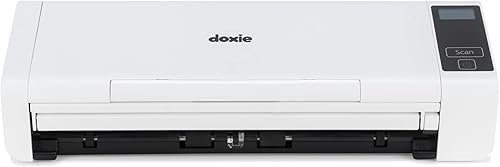
Doxie Pro: Best for simple home and office filing
- Automatic duplex scanning
- Text recognition for searchable PDFs
- 20-page collapsible feeder
- Mac and PC software
Doxie Pro combines automatic two-sided scanning with software for importing, organizing and sharing scans. It suits home offices that want receipt records without a complex setup.
Pros
- Automatic duplex scanning
- Searchable PDF text recognition
- Direct feed for thick or delicate paper
Cons
- Wired USB connection
- 20-page feeder is smaller than the office-focused models
Doxie Pro is the strongest all-around choice when you want a receipt scanner and organizer for a home office or small workspace. Its automatic duplex scanning captures both sides of a receipt or document, while text recognition turns scans into searchable PDFs.
The 20-page collapsible document feeder works for a short stack of receipts. For thicker or delicate paper, the direct feed slot gives you a separate path instead of forcing every item through the feeder.
Doxie Pro scans at up to 22 pages per minute and supports scans up to 600 dpi. Its software works with Mac and PC computers and can import, organize and send scans to Dropbox, Evernote, OneNote and iCloud.
The compact wired footprint measures about 11.75 x 4 x 3 in and weighs about 3 lb. That makes it easier to leave near a desk than a larger office scanner, but USB means it belongs beside the computer or its cable.
Choose Doxie Pro if you want clear OCR and everyday organization without a large feeder or wireless workflow. Its Best for simple home and office filing badge reflects that balance.
Epson RapidReceipt RR-620W Wireless & USB High-Speed: Best for high-volume receipt batches
- Up to 45 pages per minute
- 100-sheet automatic document feeder
- 4.3-inch color touchscreen
- Wi-Fi and USB
The RR-620W is built for larger receipt and document batches, with a 100-sheet feeder, fast duplex scanning and direct touchscreen workflows.
Pros
- Fastest stated speed here
- Largest feeder
- QuickBooks and TurboTax integration
Cons
- Heavier desktop footprint
- Windows minimum system requirement is specified, but version is not
The Epson RapidReceipt RR-620W is the best receipt scanner software with OCR for users who process large batches. Its 100-sheet automatic document feeder and speed of up to 45 pages per minute reduce the number of reloads during bookkeeping or document filing.
The scanner uses Epson ScanSmart AI PRO technology to extract and convert receipts and documents into smart, searchable, AI-ready data. Epson also states that receipt and invoice data can sync with QuickBooks, TurboTax and Excel.
Its 4.3-inch color touchscreen supports computer-free scanning to email accounts, cloud storage or connected USB flash drives. Wi-Fi and USB give you more placement choices than a wired-only scanner.
At 8.2 lb and 6.7 x 11.6 x 6.6 in, the RR-620W is a dedicated desktop unit. It needs more room than the portable pick, but the larger feeder makes sense when receipts arrive in substantial groups.
Choose it for frequent batch scanning, wireless placement or direct touchscreen workflows. Its Best for high-volume receipt batches badge reflects the capacity and speed.
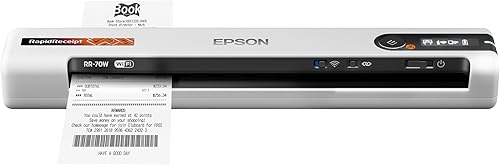
Epson RapidReceipt RR-70W Compact Mobile Document Scanner: Best for mobile receipt scanning
- Under 11 oz
- Up to 15 pages per minute
- USB or battery power
- Wireless cloud scanning
The RR-70W is the portable choice for scanning receipts away from a fixed desk. Its software can create searchable PDFs and use automatic file naming for receipts and invoices.
Pros
- Lightest model here
- USB or battery power
- Works with cloud services through the mobile app
Cons
- Single-sheet mobile workflow
- Slower than the desktop models
The Epson RapidReceipt RR-70W is the best compact receipt scanner for people who work between locations. It weighs under 11 oz, measures 10.7 x 1.3 x 1.8 in and supports USB or battery power.
Its automatic feeding mode reaches up to 15 pages per minute. The scanner handles receipts, invoices, business cards and documents up to 8.5 x 72 in, so long receipts do not need to be folded into a short scan.
Wireless connectivity lets you scan from a PC, Mac, smartphone or tablet through the Epson Smart Panel app. The workflow can send files to OneDrive, Dropbox and Google Drive, while automatic naming recognizes receipt and invoice types.
The included software creates searchable and editable PDFs on Windows and Mac computers. That makes the RR-70W more useful than a basic image-only mobile scanner, especially when you need to search old receipts later.
Choose it if your receipt scanner organizer needs to travel with you. Its Best for mobile receipt scanning badge reflects the low weight, wireless connection and flexible power options.
Canon imageFORMULA R40II Receipt Edition Office Document: Best for QuickBooks workflows
- Up to 45 pages per minute
- 60-sheet automatic feeder
- QuickBooks Online plugin
- USB-C setup
Canon focuses on receipt management through its CaptureOnTouch software and included QuickBooks Online plugin. It suits users who want a direct computer connection and a defined accounting workflow.
Pros
- Fast duplex scanning
- QuickBooks Online plugin
- Supports Windows 11 and macOS
Cons
- USB connection only
- Designed for CaptureOnTouch software
The Canon imageFORMULA R40II is the best receipt scanner for QuickBooks users who want a direct USB workflow. It includes Canon CaptureOnTouch software and a Scan to QuickBooks Online plugin for moving receipt information into that accounting system.
The R40II scans both sides at up to 45 pages per minute and uses a 60-sheet automatic feeder. That gives it enough capacity for office batches without the larger feeder of the Epson RR-620W.
Canon supports Windows 11 and macOS. Setup uses the supplied USB-C cable, so this model suits a fixed computer station rather than a wireless scanning area.
The software is central to the workflow because the R40II is designed exclusively for CaptureOnTouch. TWAIN and ISIS drivers are not supported, which matters if your current document system requires those driver types.
Choose Canon when QuickBooks Online integration and fast duplex scanning are more important than Wi-Fi or broad driver support. Its Best for QuickBooks workflows badge reflects the included accounting plugin.
RICOH fi-8040 Office & Desktop Document: Best for networked office scanning
- Up to 40 double-sided pages per minute
- 4.3-inch touchscreen
- DirectScan computer-free workflow
- OCR and PaperStream software
The fi-8040 fits offices that need OCR, indexing and network destinations. DirectScan can send scans to email or network folders without a computer.
Pros
- Ethernet and USB
- Computer-free DirectScan workflow
- OCR and image enhancement tools
Cons
- Windows system requirements are specified
- Larger office feature set may be unnecessary for occasional home scanning
The RICOH fi-8040 is the best receipt scanner with OCR for a networked office. It combines OCR, image enhancement and indexing options with Ethernet and USB connections.
The scanner reaches up to 40 double-sided pages per minute and holds up to 50 sheets. Its 4.3-inch touchscreen supports DirectScan, which can send scans to email or network folders without a computer.
PaperStream software adds a button-driven workflow for sending scans to email, print or a folder. That is useful when several people share the scanner and need a consistent destination without opening a full desktop application.
The fi-8040 handles paper, receipts, business cards, embossed cards and ID cards. Its stated system requirements focus on Windows 11, Windows 10 and several Windows Server versions, so check your office environment before choosing it for a mixed-platform setup.
Choose Ricoh if shared network access and OCR matter more than a compact home setup. Its Best for networked office scanning badge reflects DirectScan, Ethernet and PaperStream tools.
How to choose receipt scanner software with OCR
The best receipt scanner software with OCR depends on your filing destination. Start by deciding whether you need searchable PDFs, automatic file names, accounting exports, cloud folders or network delivery.
Do you need a receipt scanner and organizer for home use?
A home user usually benefits from simple software and a smaller feeder. Doxie Pro offers text recognition, automatic cropping, rotation and contrast boost, then lets you organize and send scans through its software.
The Epson RR-70W is a better fit if receipts come from travel, markets or multiple work locations. Its wireless connection and compact body reduce the need to maintain a permanent scanning station.
If you also need to print documents, compare the scanner workflow with our guide to a receipt scanner and printer. A separate printer and scanner can give you more flexibility than an all-in-one device, depending on your desk space.
How much feeder capacity do you need?
Feeder capacity matters when receipts arrive in batches. A 20-page feeder suits short stacks, while a 50-, 60- or 100-sheet feeder reduces interruptions during office filing.
Speed matters too, but only when the feeder and software can keep up. The Epson RR-620W and Canon R40II both state speeds up to 45 pages per minute, while the Ricoh reaches up to 40 and Doxie Pro up to 22.
For occasional receipts, a smaller feeder may be easier to live with. For accounting work, choose capacity based on the number of sheets you scan in one sitting rather than the maximum speed alone.
Which connection is right for receipt organization?
USB is simple for a fixed desk. Doxie Pro and Canon use USB-focused workflows, which can be useful when one computer handles the records.
Wi-Fi gives you more placement and device options. The Epson RR-620W supports Wi-Fi and USB, while the RR-70W connects wirelessly through the Epson Smart Panel app.
Ethernet is useful when several people need access to one office scanner. The Ricoh fi-8040 adds Ethernet and DirectScan for network destinations, but that feature set may be more than a single home user needs.
Can OCR replace manual receipt checks?
OCR reduces manual searching, but it does not remove the need to check important records. Receipts can be faded, folded, crowded or printed with unusual layouts.
Use searchable text to find documents quickly, then review the original scan before entering a tax, reimbursement or accounting value. Keep a consistent file naming pattern with the date, payee and purpose when your software supports manual editing.
For phone-based receipt capture, see our guide to a receipt scanner on iPhone. A phone can be convenient for one receipt at a time, while a dedicated scanner is usually easier for organized batches.
What should a small business look for?
A small business should prioritize feeder capacity, accounting integration and a filing destination that more than one person can use. The Epson RR-620W offers the largest feeder here and integrates with QuickBooks, TurboTax and Excel.
Canon is a focused choice for QuickBooks Online users who prefer USB. Ricoh is better when network folders, email delivery and computer-free scanning matter.
Our guide to the best receipt scanner for small business compares that use case in more detail. Choose the workflow first, then match the scanner's connection and feeder to it.
Is a document scanner with OCR different from a receipt scanner?
A document scanner with OCR can handle receipts, but the useful difference is often the software workflow. Receipt-focused tools may identify receipt and invoice types, organize files or connect with accounting software.
The Epson RR-70W includes automatic file naming that recognizes receipts and invoices. Ricoh adds OCR and indexing options, while Doxie emphasizes searchable PDFs and straightforward organization.
If you scan contracts, forms and office records as often as receipts, read our guide to the best document scanner with OCR. A broader document workflow may be more important than receipt-specific features.
How to organize searchable receipt records
The best receipt scanner organizer setup uses one folder structure, one file naming pattern and one backup destination. Decide those rules before scanning a large backlog.
Create folders by year, business area or tax category, depending on how you retrieve records. Keep the structure shallow enough that you can find a file without opening many nested folders.
Use OCR to search the words inside each PDF. For important records, confirm that the payee, date and amount are readable before you discard the paper copy.
Send a second copy to a trusted cloud or network destination when your workflow supports it. The Epson RR-620W, RR-70W and Ricoh fi-8040 offer direct destination options, while Doxie software can send scans to several apps.
Clean the scanning path according to the product instructions and keep receipts flat when possible. Folded edges, staples and damaged paper can slow any feeder, so use a direct feed option when the model provides one.
Verdict: which receipt scanner with OCR software should you choose?
Doxie Pro is the best receipt scanner with OCR software for most home offices because it combines duplex scanning, searchable PDFs and simple Mac or PC organization in a compact wired body. That balance suits people who scan regularly but do not need a large office feeder or wireless placement.
Choose the Epson RR-620W for large receipt batches, Wi-Fi and a 100-sheet feeder. Its capacity makes sense when receipts arrive in stacks, and the touchscreen workflow helps when a computer is not at hand.
Pick the Epson RR-70W for mobile scanning. Its low weight and battery option suit receipts collected away from a desk, while its software still creates searchable PDFs for later filing.
Choose Canon when QuickBooks Online is the main destination. The included plugin matters more than extras you may never use, provided a fixed USB connection fits your workspace.
Choose Ricoh when several people share one scanner. Ethernet, DirectScan and indexing options support network folders and email delivery without tying every job to a single computer.
Consider feeder size in daily use before you consider maximum speed. A model you reload often will slow your routine, even if its stated speed looks impressive on paper.
Consider setup and care too. A scanner that stays in one place with a clear destination is easier to keep clean and easier to use consistently.
Check the operating system and driver needs for your computer before you buy. That check prevents a good scanner from becoming a poor fit for the software you already rely on.
The right choice is the one that matches your filing path after scanning. If you want a dedicated receipt workflow for a small company, continue with the best receipt scanner for small business.
Our top 3 picks at a glance
-
1
-
2
Best for high-volume receipt batches
Epson RapidReceipt RR-620W Wireless & USB High-Speed
9.6/10 our score
See it on Amazon -
3
Best for mobile receipt scanning
Epson RapidReceipt RR-70W Compact Mobile Document Scanner
9.0/10 our score
See it on Amazon
Frequently asked questions
What is the best receipt scanner with OCR software?
Doxie Pro is the best receipt scanner with OCR software for most home and office users because it scans both sides, recognizes text and creates searchable PDFs. Choose the Epson RR-620W for larger batches, the RR-70W for mobile work or Canon for a QuickBooks-focused workflow.
What does OCR do in receipt scanner software?
OCR, or optical character recognition, turns printed words and numbers into searchable text. That lets you find a receipt by words in a PDF instead of opening files one by one.
Some scanners also use recognized text for file names, categories or accounting exports.
Can receipt scanner software organize receipts?
Yes. Receipt scanner software can organize files by using searchable text, automatic file naming, folders or cloud destinations.
Doxie software imports and organizes scans, while the Epson RR-70W can recognize receipt and invoice types for smart file naming.
Which receipt scanner works with QuickBooks?
The Epson RR-620W integrates receipt and invoice data with QuickBooks, and the Canon imageFORMULA R40II includes a CaptureOnTouch plugin for QuickBooks Online. For more choices, see our guide to the best receipt scanners for QuickBooks.
Is a portable receipt scanner worth it?
A portable receipt scanner is useful when receipts are collected away from a permanent desk. The Epson RR-70W weighs under 11 oz, supports USB or battery power and connects wirelessly.
A desktop scanner is usually a better fit for large batches or shared office filing.


