9 Best Photo Scanners for Old Photos (November 2026)
The best photo scanners for old photos include the Epson FastFoto FF-680W High-Speed Duplex Photo for large photo collections, the Canon CanoScan LiDE 400 Slim Scanner for detailed flatbed scans, and the Magnasonic All-in-One 24MP Film Scanner with Large for film and slides.
On this page (13 sections)
- The best photo scanners for old photos by use
- 1. Epson FastFoto FF-680W High-Speed Duplex Photo
- 2. Canon CanoScan LiDE 400 Slim Scanner
- 3. Magnasonic All-in-One 24MP Film Scanner with Large
- 4. Plustek ePhoto Z300 Photo Scanner
- 5. ScanSnap iX2500 Photo Edition Wireless or USB
- 6. HP Small USB Document & Photo Scanner
- 7. Pandigital Personal Photo Scanner/Converter
- 8. ClearClick QuickConvert 2.0 Photo
- 9. Epson Perfection V550 Color Photo
- How to choose a photo scanner for old photos
- More guides on this topic
- Verdict: which photo scanner for old photos should you choose?
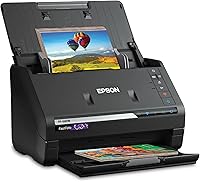
The Epson FastFoto FF-680W is the best photo scanner for old photos when you need to digitize a large family collection without spending hours on individual placements.
It scans up to 36 photos at a time, captures notes on the back with duplex scanning and supports prints up to 8 x 10 inches.
That mix suits households where prints sit in boxes, albums and envelopes and the backs often hold dates, names or short messages.
Choose the Canon CanoScan LiDE 400 for careful flatbed work and detailed individual scans.
That approach fits a smaller set of valued prints where a flat surface and close attention matter more than moving through a stack quickly.
If your memories are mostly negatives or slides, the Magnasonic FS71 is the more suitable starting point.
Film and slides need different handling from loose prints, so the format you have should come before speed or batch size.
A home printer buying guide can help if you also need printing, copying or document features.
That extra check matters when one desk device must cover prints, letters and household paperwork.
For phone-based scanning, see our guide to a photo scanner on iPhone.
Use that route for a quick copy of a single image, and use a dedicated scanner when the goal is a full family archive.
Start by sorting what you have into loose prints, mounted prints, negatives and slides.
That simple split will narrow the choice faster than comparing every specification.
Then decide whether volume, careful handling or film support is the main problem to solve.
Our picks at a glance
-
1
 Best for large photo collections
Epson FastFoto FF-680W High-Speed Duplex Photo
9.7/10 our score
See it on Amazon -
2
 Best for detailed flatbed scans
Canon CanoScan LiDE 400 Slim Scanner
9.6/10 our score
See it on Amazon -
3
 Best for film and slides
Magnasonic All-in-One 24MP Film Scanner with Large
9.5/10 our score
See it on Amazon
- 4
 Check it
Plustek ePhoto Z300 Photo Scanner
Best for gentle print feeding - 5
 Check it
ScanSnap iX2500 Photo Edition Wireless or USB
Best for photo and document workflows - 6
 Check it
HP Small USB Document & Photo Scanner
Best for portable single sheets - 7
 Check it
Pandigital Personal Photo Scanner/Converter
Best for computer-free photo saving - 8
 Check it
ClearClick QuickConvert 2.0 Photo
Best for albums and small prints - 9
 Check it
Epson Perfection V550 Color Photo
Best for high-resolution film work
The best photo scanners for old photos by use
The Epson FastFoto FF-680W is the best overall pick for large print collections, while the Canon and Plustek models suit slower, more careful scanning.
Film-focused options make more sense when your old photos are still on negatives or slides.
The first distinction is simple, because a feeder moves prints quickly while a flatbed lets you place each item by hand.
Our score weighs specifications, features and buyer feedback against the needs of someone preserving aging family prints.
We checked scanning speed, resolution, supported sizes, connection types and the amount of handling each workflow requires.
Those factors matter in daily use, not only on a spec sheet.
A fast feeder helps when hundreds of prints must be moved through one after another.
A flatbed helps when a print is curled, fragile or valuable enough to watch closely during the scan.
Resolution matters most when you plan to crop, enlarge or keep a file for long term archiving.
Connection type matters for placement, since a wired model keeps the scanner near a computer while a wireless model can sit elsewhere on the desk.
Supported sizes should be checked early, because a small format limit can exclude larger family prints.
Handling also shapes the routine, as one at a time scanning allows closer checks but takes longer for a full box.
Film support is separate from print support, so negatives and slides need a model built for those formats.
Use the collection you actually have as the guide, rather than chasing the highest number in every category.
| Product | Best for | Resolution | Photo batch size | Connections | Our score |
|---|---|---|---|---|---|
| Epson FastFoto FF-680W High-Speed Duplex Photo | large photo collections | 600 dpi | Up to 36 photos | Wi-Fi and USB | 9.7 |
| Canon CanoScan LiDE 400 Slim Scanner | detailed flatbed scans | 4800 x 4800 dpi | 9.6 | ||
| Magnasonic All-in-One 24MP Film Scanner with Large | film and slides | 24MP | 9.5 | ||
| Plustek ePhoto Z300 Photo Scanner | gentle print feeding | 300 or 600 dpi | 9.1 | ||
| ScanSnap iX2500 Photo Edition Wireless or USB | photo and document workflows | 600 dpi | 9.0 | ||
| HP Small USB Document & Photo Scanner | portable single sheets | 8.7 | |||
| Pandigital Personal Photo Scanner/Converter | computer-free photo saving | 600 dpi | 8.6 | ||
| ClearClick QuickConvert 2.0 Photo | albums and small prints | 14MP, 22MP interpolated | 8.5 | ||
| Epson Perfection V550 Color Photo | high-resolution film work | 6400 dpi optical | 8.2 |
1. Epson FastFoto FF-680W High-Speed Duplex Photo
Epson FastFoto FF-680W High-Speed Duplex Photo: Best for large photo collections
- Scans up to 36 photos at a time
- Up to 1 photo per second at 300 dpi
- Duplex scanning
- Wi-Fi and USB
Fast batch scanning, duplex capture and automatic photo corrections make this the strongest choice for a large box of aging prints.
Pros
- Batch scans up to 36 photos
- Captures notes on photo backs
- Supports photos up to 8 x 10 inches
Cons
- Larger than compact scanners
- Requires a computer for some workflows
The Epson FastFoto FF-680W is the strongest choice for a box of family prints because its automatic feeder can batch-scan up to 36 photos. The stated speed reaches 1 photo per second at 300 dpi, which makes a large project more manageable than one-at-a-time flatbed scanning.
It supports Polaroid photos, panoramas, postcards and photos up to 8 x 10 inches. You can choose 300 dpi for sharing, 600 dpi TIFF for archiving or 1200 dpi for enlargements.
Its duplex function captures the image and handwritten notes on the back in one scan. That matters for dates, names and short family messages that might otherwise be separated from the image.
The Epson FastFoto app can add voice and text, create slideshows and share from a smartphone. Automatic enhancement, color restoration, red-eye reduction, de-skew, crop and rotate tools reduce routine editing work.
Choose it for volume and organization. Before scanning fragile prints, use the included carrier sheet and cleaning cloth, and keep photos free of loose dust.
2. Canon CanoScan LiDE 400 Slim Scanner
Canon CanoScan LiDE 400 Slim Scanner: Best for detailed flatbed scans
- 4800 x 4800 dpi resolution
- USB Type-C cable
- Color restore and dust removal
- Vertical stand included
The high-resolution flatbed design suits careful scanning of individual prints when detail matters more than batch speed.
Pros
- High stated resolution
- Slim body
- One-cable data and power
Cons
- Scans one sheet at a time
- No wireless connection
The Canon CanoScan LiDE 400 is the best fit when you want detailed scans of individual prints. Its 4800 x 4800 dpi resolution gives you more room to crop or enlarge than the lower-resolution portable models.
This is a USB flatbed scanner with a slim 7.7 x 14.5 x 0.4 in body. The included USB Type-C cable carries both data and power, and the vertical stand gives you another placement option.
Canon includes color restore and dust removal features. Its EZ buttons also provide quick access to scanning, copying and PDF functions.
The trade-off is speed. The scanner handles one sheet at a time, so it is better for a smaller group of valuable prints than for thousands of mixed photos.
Pick it when image detail and a flat, steady scan surface matter most. For a faster USB-focused workflow, compare these best USB photo scanners.
3. Magnasonic All-in-One 24MP Film Scanner with Large
Magnasonic All-in-One 24MP Film Scanner with Large: Best for film and slides
- 24MP JPEG files
- 5-inch LCD display
- Supports 35mm, 110, 126 and Super 8 film
- SD card support up to 128GB
This is the better match for old negatives and slides, especially when you want to scan without a computer.
Pros
- Works without a computer
- Adjusts brightness and RGB color
- Scans film in about 5 seconds
Cons
- SD card not included
- Focused on film and slides
The Magnasonic FS71 is the best choice here for old film, negatives and slides rather than a large stack of loose prints. It creates 24MP JPEG files and supports 35mm, 110, 126 and Super 8 film plus 135, 126 and 110 slides.
A 5-inch LCD lets you view film and scanned images on the scanner itself. HDMI output lets you view images on a compatible TV or monitor, although the HDMI cable is not included.
You can save files to an SD card with support for cards up to 128GB. The scanner also works without a computer, and its controls let you adjust brightness, RGB color, flipping and mirroring.
Scanning takes less than 5 seconds per item with the included film trays. That makes it useful for a film box, but it is not the most direct choice for hundreds of 4 x 6 prints.
Choose it when the original memories are on film or slides. For more film-focused choices, see the guide to photo scanners for negatives.
4. Plustek ePhoto Z300 Photo Scanner
Plustek ePhoto Z300 Photo Scanner: Best for gentle print feeding
- CCD sensor
- Scans 4 x 6 photos in 2 seconds
- Supports photos up to 8 x 10 inches
- 300 and 600 dpi settings
Its roller design and CCD sensor suit old prints that need careful feeding and useful color detail.
Pros
- Fast 4 x 6 scanning
- Supports several print sizes
- Photo enhancement tools
Cons
- Scans one photo at a time
- USB connection only
The Plustek ePhoto Z300 suits old prints that need steady, gentle feeding.
Its CCD sensor and roller design are built around photos, and the scanner supports 3 x 5, 4 x 6, 5 x 7 and 8 x 10 in prints.
That range covers the sizes most families keep in drawers and albums.
A 4 x 6 photo takes about 2 seconds at 300 dpi, while an 8 x 10 photo takes about 5 seconds.
The scanner offers 300 dpi and 600 dpi settings, so you can use a quicker setting for sharing and a higher setting for an archive.
The software includes auto-crop, rotate and faded-color restoration tools.
It scans one photo at a time, which gives you more control but requires more feeding than the Epson FastFoto.
That pace suits a careful afternoon project rather than a race through several thousand prints.
Choose the Z300 when you want a photo-specific roller scanner without a large batch feeder.
Its 19.3 x 4 x 11.4 in dimensions also deserve a dedicated desk space.
Keep the entry path clear and feed prints straight, since a slight angle can affect the crop.
Wipe prints lightly before scanning and store the finished files by family or event.
5. ScanSnap iX2500 Photo Edition Wireless or USB
ScanSnap iX2500 Photo Edition Wireless or USB: Best for photo and document workflows
- Scans up to 36 photos
- 100-sheet document feeder
- 3 photo carrier sheets
- Wi-Fi 6 and USB-C
Choose this when old photo scanning shares a desk with document, receipt and business-card scanning.
Pros
- Wireless or USB connection
- Automatic organization features
- Photo carrier sheets included
Cons
- Primarily a document scanner
- Requires newer supported operating systems
The ScanSnap iX2500 Photo Edition works well when photo preservation is part of a wider home document system.
It holds up to 100 documents or 36 photos, and it includes 3 photo carrier sheets for delicate prints.
Those sheets help protect thin or fragile prints while they pass through the feeder.
Wireless and USB connections give you placement flexibility.
Its large touchscreen supports profiles, while automatic optimization, naming and sorting can help separate photos from receipts, documents and business cards.
That organisation helps in a home where photos and paperwork share the same desk and storage folders.
The scanner supports Windows, macOS, iOS, iPadOS, Android and ChromeOS versions listed in its system requirements.
It also supports cloud services and connections to PCs, Macs and mobile devices.
Choose it if your desk needs one scanner for several types of paper.
If you want a smaller footprint, compare these best compact photo scanners.
Check your operating system before setup, and plan clear folders for photos, receipts and cards.
That small step keeps mixed media from becoming hard to search later.
6. HP Small USB Document & Photo Scanner
HP Small USB Document & Photo Scanner: Best for portable single sheets
- 3-ounce body
- USB-powered
- 1200 dpi stated capability
- Windows and Mac compatibility
The slim HPPS100 works for occasional photos when portability and a small footprint matter more than batch scanning.
Pros
- Very light
- Fits in a bag
- Works with PC and Mac
Cons
- One-sided scanning
- Best suited to small batches
The HPPS100 is best for occasional scanning and portability.
Its body measures 2 x 11.6 x 1.4 in and weighs 3 ounces, so it is easy to move between a home desk and another workspace.
This is a 1-sided sheetfed scanner with USB power.
It supports photos, receipts, cards and paper, and HP WorkScan software includes auto-scan, size detection, preview, crop, editing and file saving tools.
The stated operating speed is 15 pages per minute for small to medium jobs.
Its compact format makes it practical for a few prints, but a large family archive will take more manual handling.
Because scanning is one-sided, a note on the back of a photo needs a second pass if you want to keep it.
Choose it when storage space and portability matter more than batch capacity.
It works with PC and Mac systems, but check the exact operating system before setting up a scanning project.
Keep a small tray or flat surface beside it, since a slim feeder still needs room for pages to land.
That setup suits a drawer, a bag or a shared desk where space is tight.
7. Pandigital Personal Photo Scanner/Converter
Pandigital Personal Photo Scanner/Converter: Best for computer-free photo saving
- 600 dpi scanning
- Scans photos up to 8.5 x 11 inches
- Saves to SD card
- No PC required
Direct SD card saving keeps the workflow simple for printed photos when you do not want to keep a computer beside the scanner.
Pros
- No computer needed
- Scans up to 8.5 x 11 inches
- One-touch operation
Cons
- Older-style workflow
- No listed wireless connection
The Pandigital Personal Photo Scanner/Converter keeps the workflow simple by saving scans directly to an SD card.
It scans printed photos up to 8.5 x 11 inches at 600 dpi and can work without a computer.
That setup suits someone who wants to preserve a group of family prints without setting up a full desktop scanning system.
Files can also transfer to a computer through USB.
The included 5-in-1 reader supports SD, MS, MSPRO, MMC and XD cards.
That gives you several ways to move saved JPEG files after scanning.
It scans one photo at a time, so choose it for a modest project rather than a full box of prints.
Keep a clear folder system on the memory card so names and family dates do not get lost later.
Label folders by family, event or decade while you scan, rather than sorting a large pile afterwards.
Use the larger size limit for oversized prints that smaller scanners cannot accept.
Keep the card backed up on a computer once a batch is complete.
8. ClearClick QuickConvert 2.0 Photo
ClearClick QuickConvert 2.0 Photo: Best for albums and small prints
- Scans 4 x 6 photos or smaller
- Scans 35mm, 110 and 126 film
- Rechargeable battery
- 5-inch preview LCD
The battery-powered design helps with albums and small prints, including photos that stay in their mounts.
Pros
- No computer required
- Cord-free scanning
- Supports film and negatives
Cons
- Does not support 5 x 7 photos
- Scans one item at a time
The ClearClick QuickConvert 2.0 is useful for small prints, albums and film when you want a battery-powered workflow.
It scans 4 x 6 photos or smaller, 35mm slides and 35mm, 110 and 126 negatives.
No computer or driver is required.
The scanner saves JPEG files to an SD memory card and shows a preview on its 5-inch LCD.
A rechargeable battery supports cord-free scanning, and the scanner can scan photos without removing them from some albums or mounts.
It does not support 5 x 7 photos, which is a key size check before choosing it.
The stated resolution is 14MP, with 22MP interpolated output.
Pick it for mobility and mixed small-format media, not for large prints or high-volume automatic feeding.
Charge the battery before a session and check the preview for placement before saving a batch.
Keep a spare card ready, since SD storage fills quickly when you work through an album.
That routine suits a table, a family gathering or a small workspace.
9. Epson Perfection V550 Color Photo
Epson Perfection V550 Color Photo: Best for high-resolution film work
- 6400 dpi optical resolution
- Built-in transparency unit
- Digital ICE
- 48-bit color depth
The V550 fits careful flatbed work with prints, slides and negatives when high optical resolution matters more than speed.
Pros
- High optical resolution
- Film and negative scanning
- Scans multiple photos at once
Cons
- Large 9.6-pound body
- Scans through a flatbed workflow
The Epson Perfection V550 is the best match for careful flatbed work across photos, film, slides and negatives.
Its 6400 dpi optical resolution and 48-bit color depth suit enlargements and detailed archival scans.
A built-in transparency unit handles 35mm slides, negatives and film.
Digital ICE removes the appearance of dust and scratches on film, while Easy Photo Fix provides one-touch restoration for faded photos.
The flatbed can scan multiple photos at once, detect their edges and save each image as a separate file.
ABBYY FineReader Sprint Plus OCR adds editable text scanning for documents.
At 19.09 x 11.02 x 4.64 in and 9.6 pounds, it needs more desk space than the portable picks.
Choose it when film support and optical detail matter more than feeder speed.
Place prints flat and check spacing before scanning, since overlapping edges can merge files.
Keep the glass clean and handle film with care to avoid marks that will appear in the scan.
That careful routine suits archival work where quality matters more than pace.
How to choose a photo scanner for old photos
The best photo scanner for old photos depends first on the number of prints and their condition. A batch feeder saves time for a large collection, while a flatbed gives you more control over one fragile or important image.
Should you choose a feeder or flatbed for old photos?
Choose a feeder when you have many loose prints in workable condition. The Epson FastFoto FF-680W and ScanSnap iX2500 can handle batches, while the Canon CanoScan LiDE 400 and Epson V550 scan from a flatbed.
A flatbed is easier to control for curled, delicate or unusually shaped prints. Feeders are better when the main problem is the size of the collection.
What resolution is enough for family photos?
Use 300 dpi for quick sharing and 600 dpi for a stronger archive. Choose a higher setting when you plan to enlarge a small print, but expect larger files and longer storage transfers.
The Canon reaches 4800 x 4800 dpi, while the Epson V550 offers 6400 dpi optical resolution. Those numbers matter most when you crop, enlarge or restore detail from a small original.
Do you need film and slide scanning?
You need film support if your family memories are still on negatives or slides. The Magnasonic FS71 is designed around those formats, while the ClearClick QuickConvert 2.0 handles small prints plus several film types.
The Epson V550 combines film support with a flatbed for printed photos. A standard photo-only scanner is simpler if you have no film to preserve.
How should you prepare aging prints?
Handle old photos by their edges, keep the scanning surface clean and remove loose dust before feeding a print.
Use a carrier sheet when the scanner includes one and avoid forcing a photo into a tight path.
That care reduces scratches and helps the scanner pull each print through evenly.
Check both sides before you start, because dates and names on the back are part of the family record.
Scan in batches by family, event or decade.
Use file names that include the date or people when known, then keep a second copy on another drive or cloud service.
A clear name helps far more than a long folder path that nobody remembers later.
Do a quick preview check for cropping, glare and colour before moving to the next batch.
If a print is stuck, curled or brittle, switch to a flatbed or a carrier sheet rather than forcing it through.
For a phone-based backup or a small number of images, the best portable photo scanner options may be easier to store.
For larger collections, batch scanning will save more time.
Store originals in acid free sleeves after scanning, and keep the digital copies in two places.
That pairing protects the image and the story attached to it.
More guides on this topic
- Best Photo Scanners for Multiple Photos, useful when a feeder and batch capacity matter more than single print control.
- Best Photo Scanners for Mac, helpful when your scanning workflow runs on a Mac and software support matters.
Verdict: which photo scanner for old photos should you choose?
The Epson FastFoto FF-680W is the best photo scanner for old photos when you have many loose prints and want batch speed, automatic corrections and duplex capture.
Pick the Canon CanoScan LiDE 400 for high-resolution individual scans.
That choice suits a smaller group of prints where detail and a flat scan surface matter most.
Choose the Magnasonic FS71 for negatives and slides, the Plustek Z300 for photo-specific feeding and the HPPS100 for portable single-sheet work.
Each one fits a different starting point, from film boxes to a tight desk.
The right choice is the one that matches your original media, collection size and preferred file workflow.
If most of your memories are loose prints, start with batch capacity and duplex capture.
If they are on film, start with film support and a clear preview workflow.
If they are few and fragile, a flatbed gives you the most control.
Check supported sizes before you buy, since a single limit can exclude the prints you care about most.
Then set up folders and file names before the first scan, so the archive stays easy to search.
Our top 3 picks at a glance
-
1
Best for large photo collections
Epson FastFoto FF-680W High-Speed Duplex Photo
9.7/10 our score
See it on Amazon -
2
Best for detailed flatbed scans
Canon CanoScan LiDE 400 Slim Scanner
9.6/10 our score
See it on Amazon -
3
Best for film and slides
Magnasonic All-in-One 24MP Film Scanner with Large
9.5/10 our score
See it on Amazon
Frequently asked questions
What is the best photo scanner for old photos?
The Epson FastFoto FF-680W is the best photo scanner for old photos when you have many prints to digitize. It scans up to 36 photos at a time, supports photos up to 8 x 10 inches, captures both sides and offers automatic correction tools.
Choose Canon for individual flatbed scans or Magnasonic for negatives and slides.
Is a flatbed scanner better for old photos?
A flatbed scanner can be better for individual prints, fragile photos or work where detail matters more than speed. The Canon CanoScan LiDE 400 reaches 4800 x 4800 dpi, while the Epson Perfection V550 adds film scanning and 6400 dpi optical resolution.
A sheetfed model is faster for a large stack.
What resolution should you use for old photo scanning?
Use 300 dpi for convenient sharing and 600 dpi for archiving or additional editing. Higher settings can help when you plan to enlarge a small print, but they also create larger files.
The Epson FastFoto FF-680W offers 300, 600 and 1200 dpi options for different jobs.
Can a photo scanner scan negatives and slides?
Yes, but you need a model designed for film or slides. The Magnasonic FS71 supports 35mm, 110, 126 and Super 8 film plus 135, 126 and 110 slides.
The ClearClick QuickConvert 2.0 and Epson Perfection V550 also support film formats, while ordinary flatbeds may not.