Apple iMac vs Laptop: Which Should You Choose? (November 2026)
Choose an iMac for a dedicated desk with a large built-in display, or a laptop if you need to work in different places. Your workspace, screen needs and plans to move your computer matter more than the shared Apple ecosystem.
On this page (9 sections)
- Apple iMac vs Laptop: Which Should You Choose?
- Apple iMac vs laptop: what is the main difference?
- Which computer is easier to move?
- Which screen size fits your work?
- What changes with the ports and accessories?
- Which Mac configuration makes sense for your workload?
- Which one is easier to set up?
- What if you want an Apple desktop without an iMac?
- How should you make the final choice?
Apple iMac vs Laptop: Which Should You Choose?
Choose an Apple iMac for a permanent desk and a large built-in screen, or a Mac laptop if you need to carry your computer. The Apple iMac vs laptop choice depends on your daily workspace, how much display area you want and whether you need to work away from power.
An iMac combines the computer and its display in one unit. A laptop folds its display and keyboard together and runs on battery, so it can move with you.
Both can work well for everyday tasks. Start by deciding whether your computer should stay in one place or travel with you.
 Best for more memory and storage
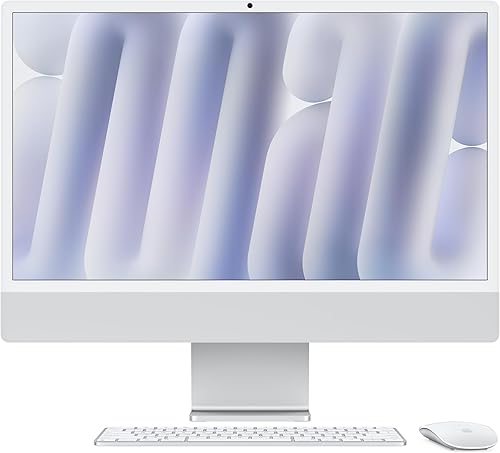
Apple 2024 iMac All-in-One Desktop Computer
Apple iMac vs laptop: what is the main difference?
The iMac is a desk computer with a built-in display, while a laptop is a portable computer with its own screen and battery. That difference shapes where you can work and what you need to set up.
The 2024 iMac options here have a 24-inch 4.5K Retina display. The 2026 MacBook Neo has a 13-inch Liquid Retina display, and the MacBook Air has a 13.6-inch Liquid Retina display.
A bigger screen can make a desk feel less cramped when you keep several windows open. A smaller laptop display takes up less room and travels with the computer.
An all-in-one keeps the computer and screen together in one desktop unit. For a closer look at that design, read how an all-in-one computer works.
Which computer is easier to move?
Choose a laptop if you expect to work in different rooms or take your computer outside the home. Its built-in screen, keyboard and battery let you use it without setting up a separate display.
The MacBook Neo and MacBook Air each have a stated weight of 2.71 lb. Apple lists the Neo with up to 16 hours of battery life and the Air with up to 18 hours.
Battery life figures are manufacturer claims, and your actual time away from an outlet can vary with use. Plan to charge the laptop regularly, especially if your workday runs long.
The iMac is a desktop for a fixed location. It weighs about 9.7 lb and needs a suitable desk and power connection, so it takes more planning to relocate than a laptop.
Apple iMac vs laptop for a desk setup
An iMac keeps the computer behind its 24-inch screen, reducing the number of separate pieces to place on a desk. It also has a built-in camera, microphones and speakers.
A laptop can form a desk setup too, but its screen sits lower and is smaller than the iMac's. You can add an external display, though that means choosing and connecting another screen.
The right desk setup depends on how long you work there and what else shares the surface. Measure the available width and depth, then account for a keyboard, mouse, lamp and anything else you use.
Our guide to how an all-in-one differs from a laptop on a desk explains the trade-offs in more detail.
Which screen size fits your work?
Pick the iMac if a large built-in display is a priority; pick a MacBook if you value a compact screen that travels. The 24-inch iMac display gives you more screen area than either 13-inch laptop display.
For writing, email and video calls, a smaller display may be enough if you usually focus on one task at a time. For side-by-side windows, spreadsheets or a large working canvas, the iMac screen gives you more space without adding a monitor.
Display size is only one part of comfort. Consider viewing distance, room lighting and whether the screen height suits your posture; follow the setup guidance for your workspace.
Can a laptop work like an iMac at a desk?
A laptop can serve as your main computer at a desk, especially if your work is light enough for its built-in display and keyboard. An external display can expand the workspace when you need more room.
The MacBook Air supports up to two external displays. The iMac also supports connecting up to two external 6K displays, according to its feature details.
Extra displays add cost, cables and setup choices. If you already know you want a larger workspace, compare the full desk setup rather than the computer alone.
What changes with the ports and accessories?
Check the ports against the devices you already own before choosing either format. The iMac has up to four Thunderbolt 4 ports, while the MacBook Air has two Thunderbolt 4 ports, a MagSafe charging port and a headphone jack.
A laptop may need a hub or adapter if you connect several wired accessories at once. An iMac has more listed Thunderbolt ports, but you should still confirm that the exact configuration fits your equipment.
Wireless accessories can reduce cable clutter at either desk. If you need a longer connection to a device, our guide to best USB extension cables can help you think through cable length and placement.
Both formats support Wi-Fi and Bluetooth, though the specific versions vary between the configurations described here. Match those details to the network and accessories you plan to use.
Which Mac configuration makes sense for your workload?
Choose based on the memory and storage you need, not only on whether the computer sits on a desk. The two iMac configurations and two laptops differ in memory, storage and chip.
The first iMac has an M4 chip with an 8-core CPU and 8-core GPU, 16GB unified memory and a 256GB SSD. The second has an M4 chip with a 10-core CPU and 10-core GPU, 24GB unified memory and a 512GB SSD.
The MacBook Neo has an A18 Pro chip, 8GB unified memory and a 256GB SSD. The MacBook Air has an M5 chip, 16GB unified memory and a 512GB SSD.
These configurations don't make the desktop automatically better for every task. Check the memory and storage against your apps and files, and consider external storage if your collection is large.
When does the iMac's display matter more than laptop portability?
The iMac makes more sense when your computer stays in one room and you want the large display ready every day. Its built-in camera and audio also keep common video-call equipment in the same unit.
Pick an iMac configuration by the amount of memory and storage you expect to need. The 16GB and 256GB option suits a tighter storage plan, while the 24GB and 512GB option provides more room in both areas.
When is a MacBook the more practical choice?
A MacBook is the practical choice when you need the same computer at home, at school or in another workspace. The battery lets you move away from an outlet for a while, subject to your workload and Apple's stated battery-life figure.
The Neo is the lighter listed entry for everyday mobile work, with 8GB unified memory and 256GB storage. The Air has 16GB unified memory and 512GB storage, along with a 13.6-inch display.
Which one is easier to set up?
The iMac needs a place to sit and a power connection; a laptop can work from a desk, couch or shared table. Neither format removes the need to plan for charging, accessories and a comfortable screen position.
With an iMac, choose the desk location before setup. Leave room for the computer, its power cable and any keyboard, mouse or external devices you want to connect.
With a laptop, the first setup is simpler if you plan to use it on its own. A stand, external keyboard or monitor may make a long desk session more comfortable, but adds pieces to your workspace.
A laptop still needs charging and protection when you carry it. Store it safely between trips and keep its power adapter available where you'll use it.
What if you want an Apple desktop without an iMac?
Consider a Mac mini if you want a desktop Mac but prefer to choose your own display and accessories. It is another way to build a fixed desk setup, though you need to plan for the separate parts.
The iMac includes its display as part of the computer. A Mac mini setup means pairing the computer with a monitor, keyboard and mouse, which can suit people who already own those items or want a particular screen.
That flexibility comes with extra decisions about compatibility, cables and desk space. Compare the options in Apple Mac mini vs iMac before settling on a desktop format.
How should you make the final choice?
Choose an iMac for a dedicated workspace and its built-in 24-inch display; choose a MacBook if you need the computer to move with you. Then compare memory, storage and ports within the format that fits your routine.
Pick the iMac if your computer will stay on a desk and you value the larger display without a separate monitor. Pick the MacBook Neo for portable everyday work, or the MacBook Air if you want more listed memory and storage.
For the Apple iMac vs laptop decision, use one rule: choose the iMac for a ready-made desk setup, or a laptop for work that follows you. If you want a battery-powered computer, the laptop is the clear fit; for a stable desk and more screen area, choose the iMac.
Frequently asked questions
Is an iMac better than a laptop for home use?
An iMac fits home use if you work mainly at one desk and want a 24-inch display built into the computer. A laptop fits better if you move between rooms, travel, or need to take your computer to class or work.
Think about where you use it on a normal day.
Can you use an iMac without a desk?
An iMac needs a stable surface and a power connection, so it works best in a planned workspace. Its display and computer are part of one unit, which makes it easier to set up than a tower and separate monitor, but it isn't designed to work unplugged around the house.
Does a MacBook replace an iMac?
A MacBook can replace an iMac if portability matters more to you than having a large built-in display at your desk. You can connect a laptop to an external display, but that adds another device and setup step.
Decide whether you'll use the laptop away from your desk often enough to justify it.
Do iMacs have batteries?
An iMac isn't a battery-powered portable computer, so plan to use it at a desk near power. A laptop includes a battery for working away from an outlet.
See our guide to whether all-in-one computers have built-in batteries for more about desktop power and portability.
Should you get an iMac or a Mac mini?
Choose an iMac if you want the computer and display together in one unit. A Mac mini is a small desktop computer that you pair with a display and other peripherals, which gives you more choice over that setup.
Compare the options in our Apple Mac mini vs iMac guide.