Epson EcoTank ET-4800 Review: Worth It? (November 2026)
The Epson EcoTank ET-4800 suits a home office that needs refillable ink, a 30-sheet ADF and fax. It prints single-sided, so choose another model if automatic two-sided printing matters.
On this page (7 sections)
The Epson EcoTank ET-4800 is a home-office printer with refillable ink, a 30-sheet automatic document feeder and fax. Its main limit is that printing, scanning and copying are single-sided, so it won't automate two-sided paperwork.
The ET-4800 combines print, copy, scan and fax functions with Wi-Fi, Wi-Fi Direct, USB and Ethernet. We compared its features with two other EcoTank models to show where the feeder and fax are useful, and when a simpler or wider-format printer makes more sense.
What does the Epson EcoTank ET-4800 offer?
The ET-4800 pairs cartridge-free refillable ink with four office functions and a 30-sheet ADF. It suits a desk where people print routine documents, scan batches of single-sided pages and occasionally send or receive faxes.
Epson EcoTank ET-4800 Wireless All-in-One Supertank Color: Best for home office documents and fax

- Refillable ink tanks
- 30-sheet ADF
- Print, copy, scan and fax
- Wi-Fi and Ethernet
A home-office all-in-one with refillable ink, a 30-sheet document feeder and fax. Its printing, scanning and copying are single-sided.
Pros
- Refillable ink tanks
- 30-sheet ADF handles multi-page originals
- Fax function included
- Wi-Fi, Wi-Fi Direct and Ethernet
Cons
- No automatic two-sided print, scan or copy
- ADF holds 10 legal-size sheets
- 100-sheet paper capacity
Black print speed is up to 10 pages per minute, with color up to 5 pages per minute. The paper tray holds up to 100 sheets, and the printer supports media up to 8.5 x 14 in.
The included ink set contains one black bottle and one bottle each of cyan, magenta and yellow. Epson says each replacement bottle set can print up to 4,500 black pages and 7,500 color pages; actual yield depends on print jobs and use.
Who should choose the ET-4800?
Choose it if you regularly scan multi-page, single-sided documents and want fax in the same machine. The ADF lets you load a small stack instead of placing each sheet on the flatbed one at a time.
It is also a fit if you want both Wi-Fi and wired Ethernet options. A 100-sheet tray and single-sided workflow are better matched to a modest home office than to a team that prints large batches of double-sided documents.
Skip it if automatic duplex printing is a must-have. The home printer buying guide can help you compare printer types and features before settling on a workflow.
Is the ET-4800 ADF useful for home-office scanning?
Yes, the 30-sheet ADF saves repeated loading for single-sided originals. It supports letter and legal paper, with a capacity of 10 legal-size sheets.
The ADF scans one side at a time. For two-sided originals, you'll need to turn the pages and scan the backs separately, so consider how often you handle contracts, forms or other double-sided paperwork.
The flatbed is useful for a single page or an item that should not go through a feeder. Its maximum scan area is 8.5 x 11.7 in, while the ADF can scan a single-sided original up to 8.5 x 14 in.
If you need to compare feeder designs across EcoTank models, see our guide to the best Epson EcoTank printer with ADF. The ET-4800's 30-sheet capacity is a modest batch size, not a replacement for a high-volume document scanner.
What does fax add to the ET-4800?
Fax gives the ET-4800 a direct office function beyond printing and scanning. It supports fax transmission at up to 33.6 Kbps and can store up to 100 pages in memory.
The printer also supports speed dials and PC fax software. Before relying on fax, check that your office has a compatible phone connection and decide whether incoming pages need to print automatically or be handled from a computer.
For a home office that never sends faxes, the feature may add little value. A simpler all-in-one could be a better fit if scanning and copying are occasional tasks.
How does refillable ink fit a home office?
Refillable tanks can suit regular printing where frequent cartridge changes are a hassle. The ET-4800 uses four ink bottles, and Epson says a replacement set yields up to 4,500 black pages and 7,500 color pages.
Those yields are estimates, not a promise for every user. Page coverage, document type and print settings affect how quickly ink runs out, so a household that prints only a few pages each month may not benefit as much as one with steady paperwork.
Refilling means handling bottles and matching each color to its tank. Follow Epson's instructions and use ink intended for the printer.
Our step-by-step article explains how to refill an Epson EcoTank printer.
What are the ET-4800's main limits?
The biggest limit is single-sided operation across print, scan and copy. You can manually turn pages for two-sided work, but the printer won't flip sheets or scan both sides in one pass.
Its 100-sheet paper capacity also means you'll reload more often than with a larger office printer. The ADF works best for short batches, and legal-size stacks top out at 10 sheets.
The ET-4800 prints up to 8.5 x 14 in. If you need wide-format pages or specialty paper handling, compare the ET-15000 below and check the specific feed path for the media you plan to use.
How does it compare with other EcoTank printers?
The ET-4800 stands out for combining an ADF and fax in a home-office size. The ET-2800 is a simpler option, while the ET-15000 handles larger print sizes and faster stated output.
| Printer | Feeder and fax | Stated print speed | Best fit |
|---|---|---|---|
| Epson EcoTank ET-4800 Wireless All-in-One Supertank Color | 30-sheet ADF; fax | 10 ppm black, 5 ppm color | Home-office documents and fax |
| Epson EcoTank ET-2800 Wireless Color All-in-One Supertank | Flatbed; no fax | 10 ppm black, 5 ppm color | Basic home printing |
| Epson EcoTank ET-15000 Wireless All-in-One Wide-Format Supertank | ADF and fax | 17 ppm black, 9 ppm color | Wide-format office work |
When is the ET-2800 a better fit?
The ET-2800 makes more sense if you need basic print, scan and copy functions without an ADF or fax. Its flatbed can handle individual pages, but you must place multi-page originals one at a time.
Epson EcoTank ET-2800 Wireless Color All-in-One Supertank: Best for basic home printing
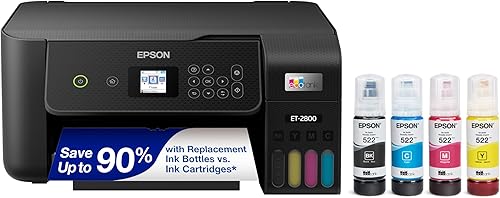
- Refillable ink tanks
- Wireless printing
- Flatbed scanning and copying
A simpler EcoTank for basic home printing, scanning and copying. It has a flatbed scanner rather than an ADF or fax function.
Pros
- Refillable ink tanks
- Wireless connectivity
- Print, scan and copy
Cons
- No ADF
- No fax function
Its refillable tanks also suit households that print regularly and want to reduce cartridge changes. Choose the ET-4800 if scanning batches or faxing is part of your normal routine.
When is the ET-15000 worth considering?
Consider the ET-15000 if your work needs prints up to 13 x 19 in or more speed than the ET-4800's stated 10 ppm black and 5 ppm color. It also has a 250-sheet front tray and a rear specialty-paper feed.
Epson EcoTank ET-15000 Wireless All-in-One Wide-Format Supertank: Best for wide-format office work

- Refillable ink tanks
- Prints up to 13 x 19 in
- Print, copy, scan and fax
- Wi-Fi and Ethernet
A larger-format EcoTank for offices that need prints up to 13 x 19 inches. It adds more speed and paper capacity, but takes up more room.
Pros
- Prints up to 13 x 19 in through rear feed
- Print, copy, scan and fax
- 250-sheet front tray and rear specialty-paper feed
Cons
- Larger footprint than the ET-4800
- Wide-format features may be unnecessary for routine documents
Its larger size and wider media support can be unnecessary for a desk that handles standard letters and forms. If cardstock is your main concern, compare the best Epson EcoTank printer for cardstock and confirm the feed path and media limits for your specific paper.
Should you buy the Epson EcoTank ET-4800?
Buy the ET-4800 if refillable ink, a 30-sheet ADF and fax solve real home-office needs. Choose the ET-2800 for simpler flatbed jobs, or the ET-15000 when wide-format printing and its larger paper capacity matter.
Before choosing, count how often you scan stacks, send faxes and print on both sides. If a feeder and fax would sit unused, compare the best Epson EcoTank printer sale for other models; if your work needs broader media choices, consider the flatbed scanner for negatives and slides or best portable printer for photos only when those specific tasks matter.
For ordinary office documents, the ET-4800 is easiest to justify when its feeder and fax replace steps you already do. For photo-focused printing, see our guide on are color laser printers good for photos before choosing a printer based on the wrong print technology.
Frequently asked questions
Does the Epson EcoTank ET-4800 print on both sides automatically?
No. The ET-4800 prints on one side at a time and does not support automatic two-sided printing, scanning or copying.
You can turn pages manually for duplex jobs, but that adds handling.
If most of your office documents need two-sided output, compare models that explicitly include automatic duplex.
How many pages can the ET-4800 ADF hold?
The ET-4800 ADF holds up to 30 sheets of letter-size paper, or 10 legal-size sheets. It scans one side at a time, so two-sided originals need to be turned over and fed again.
For larger batches, check whether the feeder capacity and manual handling fit your routine.
Can the Epson EcoTank ET-4800 send faxes?
Yes. Fax is one of the ET-4800's four functions, alongside printing, copying and scanning.
Its fax speed is up to 33.6 Kbps, and it can store up to 100 pages in memory.
Check that your office phone setup supports the fax connection you plan to use.
Is the ET-4800 suitable for a home office?
The ET-4800 fits a home office that needs refillable ink, wireless or Ethernet connections, a document feeder and fax. It has a 100-sheet paper capacity and no automatic duplex, so it is less suited to high-volume jobs or frequent two-sided workflows.
Check your monthly print needs before choosing.


