8 Best Compact Wireless Printers for Home (November 2026)
The best compact wireless printers for home include the Canon MegaTank G3270 All-in-One Wireless Color Printer for low-refill home printing, the Brother DCP-L2640DW Wireless Compact Monochrome Multi-Function Printer for fast black-and-white multipurpose work, and the Canon PIXMA TS6520 Wireless Color Inkjet Printer for compact everyday color.
On this page (6 sections)
The best compact wireless printer for most homes is the Canon MegaTank G3270, because it combines wireless print, copy and scan functions with a stated yield of up to 6,000 black-and-white or 7,700 color pages from one set of inks. Choose the Brother DCP-L2640DW for faster black-and-white work, or the Canon PIXMA TS6520 for a shorter color all-in-one.
A compact printer for home use still needs to match your actual jobs. Families may need color documents and scanning, while a home office may value automatic duplex printing, a larger paper tray and faster black-and-white output.
If you're comparing printer types, start with our home printer buying guide. For a broader list of home-focused models, see our guide to the best wireless printer for home use.
Our picks at a glance
-
1
 Best for low-refill home printing
Canon MegaTank G3270 All-in-One Wireless Color Printer
9.7/10 our score
See it on Amazon -
2
 Best for fast black-and-white multipurpose work
Brother DCP-L2640DW Wireless Compact Monochrome Multi-Function Printer
9.6/10 our score
See it on Amazon -
3
 Best for compact everyday color
Canon PIXMA TS6520 Wireless Color Inkjet Printer
9.5/10 our score
See it on Amazon
- 4
 Check it
HP Envy 6155 Wireless All-in-One Color Inkjet
Best for touchscreen home printing - 5
 Check it
Gloryang Inkless Portable Printer for Travel
Best for inkless mobile printing - 6
 Check it
Brother HL-L2405W Wireless Compact Monochrome Laser Printer
Best for simple fast document printing - 7
 Check it
Rongta Thermal Portable Printers Wireless for Travel
Best for portable letter-size thermal output - 8
 Check it
Epson WorkForce WF-110 Wireless Color Mobile Portable
Best for rechargeable color portability
The best compact printer wireless picks for home
The best compact printer wireless choice depends on whether you need color, copying, scanning, fast documents or portable output. The 8 picks below are ordered by score, with the highest-scoring match first.
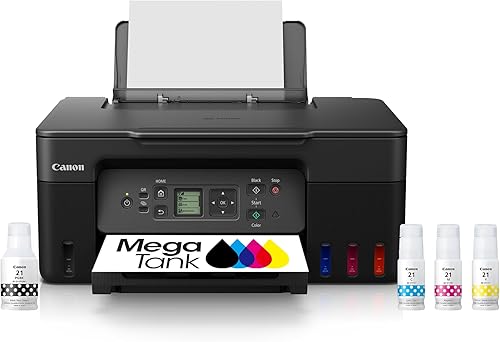
Canon MegaTank G3270 All-in-One Wireless Color Printer: Best for low-refill home printing
- Wireless print, copy and scan
- Up to 2 years of ink included
- Up to 6,000 black-and-white or 7,700 color pages using one ink set
- 1.35-inch square LCD
The MegaTank G3270 combines color printing with copying and scanning, plus wireless access from smartphones and tablets. Its stated ink yield makes it a strong fit for households that print often.
Pros
- Print, copy and scan
- Large stated ink yield
- Wireless access
Cons
- Single-sided printing
- Larger footprint than the portable picks
The Canon MegaTank G3270 is the best fit for a household that prints in color and wants one machine for several tasks. Wireless print, copy and scan functions cover everyday documents, copies and scans without adding a second device.
Canon includes black, cyan, magenta and yellow ink bottles, print heads, documentation and a power cord. The printer has a 1.35-inch square LCD and works with smartphones and tablets through an app.
Its strongest point is the stated ink capacity. Canon says one set can print up to 6,000 black-and-white pages or 7,700 color pages, with up to 2 years of ink included.
The trade-off is size. At 21.9 x 16.4 x 10.6 inches and 13.2 lb, it needs more desk depth than the small portable models.
It also uses single-sided printing.
Choose it when low-refill color printing and all-in-one functions matter more than the smallest footprint.
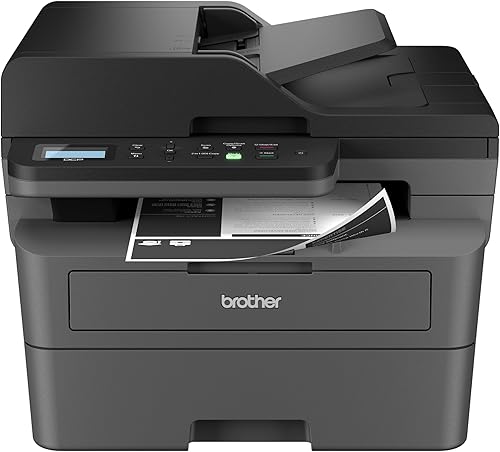
Brother DCP-L2640DW Wireless Compact Monochrome Multi-Function Printer: Best for fast black-and-white multipurpose work
- Print, copy and scan
- Up to 36 pages per minute
- 50-page auto document feeder
- Automatic duplex printing
This monochrome laser model suits document-heavy homes and small businesses. Its auto document feeder, automatic duplex printing and 250-sheet paper tray reduce handling during larger jobs.
Pros
- Fast 36 ppm black-and-white printing
- 50-page auto document feeder
- Wireless, Ethernet and USB
Cons
- Black-and-white output only
- Heavier than the inkjet and portable options
The Brother DCP-L2640DW is the strongest match for a home office that prints many black-and-white pages. Its 36 pages-per-minute print speed, 50-page auto document feeder and automatic duplex printing make multi-page work easier to manage.
This is a monochrome multifunction printer, so it prints, copies and scans but does not produce color output. It connects through dual-band wireless, Ethernet or USB, giving you more setup choices than a wireless-only printer.
The 250-sheet paper tray reduces how often you reload paper. Brother also lists mobile printing through the Brother Mobile Connect app, with support for laptops, PCs, smartphones, tablets and iPhone.
At 15.7 x 16.1 x 12.5 inches and 25 lb, it is compact for a multifunction laser printer but not light. Place it on a firm desk where you can reach the paper tray and controls without moving it often.
Ethernet suits a fixed work area where a stable wired link is preferred. Wireless fits a shared home network, while USB suits a single computer nearby.
Choose it when speed and document handling are more important than color or portability. It suits invoices, contracts and school forms that are mostly text.
Canon PIXMA TS6520 Wireless Color Inkjet Printer: Best for compact everyday color
- Automatic duplex printing
- Print, copy and scan
- 1.42-inch OLED display
- Dual-band Wi-Fi
The PIXMA TS6520 is a compact color all-in-one for documents, school work and photos. Automatic 2-sided printing and dual-band Wi-Fi add useful home features without a tall cabinet.
Pros
- Compact 6.7-inch height
- Automatic 2-sided printing
- Color printing, copying and scanning
Cons
- No auto document feeder
- Uses a 2-cartridge hybrid ink system
The Canon PIXMA TS6520 is a strong compact color choice for families, students and hybrid workers. Its 14.8 x 14 x 6.7-inch footprint gives it a short profile, while print, copy and scan functions cover common home tasks.
Automatic duplex printing helps reduce paper use during longer documents. The 1.42-inch monochrome OLED display shows printer status, and dual-band Wi-Fi supports connections on 2.4GHz or 5GHz networks.
Canon includes a starter set of PG-295 black and CL-286 color ink tanks, a power cord and setup documentation. It supports printing from laptops, PCs, smartphones and tablets, with mobile services such as Canon PRINT, Apple AirPrint and Mopria Print Service.
The short height makes it easier to place under a shelf or beside a monitor. Check that the paper path and scanner lid still have room to open in your chosen spot.
The main limitation is the lack of an auto document feeder. Choose this model if you scan or copy occasional pages rather than multi-page stacks.
It fits recipes, homework and forms where color matters but volume stays modest. Keep spare paper nearby so the compact body does not force frequent refills.
HP Envy 6155 Wireless All-in-One Color Inkjet: Best for touchscreen home printing
- Print, scan and copy
- 2.4-inch color touchscreen
- Automatic duplex printing
- 100-sheet input tray
The Envy 6155 gives home users color printing, scanning and copying with a color touchscreen and 100-sheet input tray. It also supports dual-band Wi-Fi and mobile printing through the HP app.
Pros
- Color touchscreen
- Automatic duplex printing
- 100-sheet input tray
Cons
- Cartridge use is restricted to original HP chips or circuitry
- Print speeds are lower than the laser picks
The HP Envy 6155 suits home users who want a color touchscreen and a simple all-in-one workflow. It prints, scans and copies, with automatic duplex printing and a 100-sheet input tray.
The 2.4-inch color touchscreen gives the printer a direct control surface, while the HP app supports printing, scanning, copying and faxing from a smartphone. Dual-band Wi-Fi is included for wireless home printing.
HP lists speeds of up to 10 black-and-white pages per minute and 7 color pages per minute. The printer accepts letter media up to 8.5 x 11 inches and measures 17.05 x 5.35 x 14.21 inches.
One buying detail matters for long-term use: this printer is intended to work only with cartridges that have original HP chips or circuitry. Choose it if the touchscreen and HP app fit your routine, and review our best HP wireless printer guide for more options.
Gloryang Inkless Portable Printer for Travel: Best for inkless mobile printing
- Inkless thermal printing
- Bluetooth connection
- Carry case and 3 rolls of letter-size thermal paper
- Supports 8.5 x 11-inch thermal paper
The Gloryang is for shoppers who need a portable printer without ink, toner or ribbons. It connects through Bluetooth and supports letter-size thermal paper, but it only works with compatible Gloryang thermal paper.
Pros
- No ink, toner or ribbons
- Includes a carry case and 3 paper rolls
- Works with smartphones, tablets and computers
Cons
- Prints only
- Thermal paper is required
- Bluetooth rather than Wi-Fi
The Gloryang is the best fit when you need a compact printer that avoids ink, toner and ribbons. Its thermal printing system works over Bluetooth with iOS and Android devices through the Jadens Printer app.
The package includes the portable thermal printer, a carry case, a charging USB cable, a manual and 3 rolls of letter-size thermal paper. It supports 8.5 x 11-inch thermal paper and can print from laptops and computers after the driver is installed.
This is a print-only machine. It cannot replace an all-in-one printer when you need scans or copies, and it is not for regular plain paper.
Gloryang thermal paper is required.
The printer measures 11 x 4 x 4 inches and weighs 3.1 lb according to the supplied specifications. Choose it for travel, school work or occasional documents when inkless operation matters more than Wi-Fi or color.
For laptop bags and trips, compare compact printers for travel.
Brother HL-L2405W Wireless Compact Monochrome Laser Printer: Best for simple fast document printing
- Up to 30 pages per minute
- Dual-band wireless
- 250-sheet paper tray
- Mobile printing
The HL-L2405W keeps the job focused on crisp black-and-white documents. Its 250-sheet tray and dual-band wireless make it a practical compact printer for home offices that do not need scanning or color.
Pros
- 30 ppm black-and-white printing
- 250-sheet paper tray
- Compact 7.2-inch height
Cons
- Print only
- Manual duplex printing
- Black-and-white output
The Brother HL-L2405W is a focused choice for black-and-white home documents. It prints up to 30 pages per minute, uses dual-band wireless, and includes a 250-sheet paper tray.
Unlike the DCP-L2640DW, this model is print only. It does not scan or copy, so it takes less responsibility in your setup but cannot replace a multifunction printer.
The 14.2 x 14 x 7.2-inch body gives it a relatively short height for a laser printer. Brother lists mobile printing through the Brother Mobile Connect app and USB connection for local printing.
Duplex printing is manual, which means you need to handle the pages when you want two-sided output. Keep a clear stack area beside the printer so reinserted pages stay in order.
The 250-sheet tray suits repeated letters, statements and work papers between refills. Dual-band wireless lets laptops, phones and tablets share the printer without a cable across the room.
Choose this model for sharp black-and-white documents, a larger paper tray and a smaller footprint than a multifunction laser. It suits a desk that mainly sends documents to print.
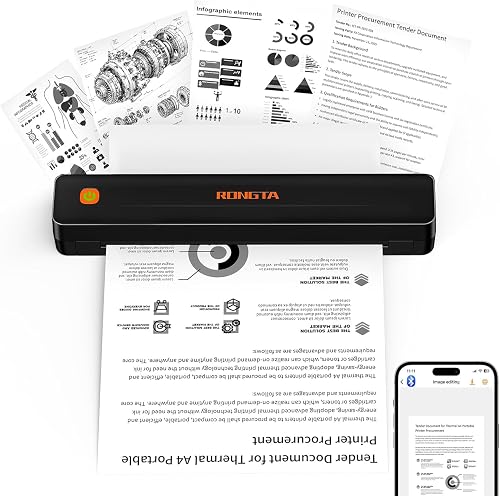
Rongta Thermal Portable Printers Wireless for Travel: Best for portable letter-size thermal output
- Inkless thermal printing
- Bluetooth and USB
- Supports US Letter, Legal and A4 thermal paper
- 203 dpi output
The Rongta F11A is a thin portable printer for travel documents, forms and assignments. It uses thermal paper and connects through the RONGTA app, so it is best for buyers who accept those limits.
Pros
- Very thin portable design
- No ink or ribbons
- Supports several thermal paper sizes
Cons
- Does not support normal paper
- Bluetooth pairing must use the RONGTA app
- Print only
The Rongta F11A is for travel documents, forms and assignments when a thin portable design matters. It uses inkless thermal printing and supports US Letter, Legal and A4 thermal paper.
Bluetooth connects through the RONGTA app on iOS or Android phones and tablets. USB connection supports laptops, with compatibility for Windows 7 through 11 and macOS listed in the product information.
The printer measures 10.55 x 2.28 x 1.18 inches and weighs 0.43 kg. It prints only, uses simplex output and produces monochrome pages at 203 dpi.
Normal copy paper is not supported. You also cannot pair the printer with a phone or tablet directly outside the RONGTA app.
That app step matters during setup, so install it before you travel and test a page at home. Keep the printed sheet size matched to the thermal roll you loaded.
Choose it when thin, inkless portability is more useful than Wi-Fi, color or all-in-one functions. It suits a bag, car or compact drawer where a full inkjet would not fit.
Epson WorkForce WF-110 Wireless Color Mobile Portable: Best for rechargeable color portability
- Wireless color printing
- Built-in rechargeable lithium-ion battery
- Wi-Fi Direct
- USB and AC charging
The Epson WF-110 is a color inkjet for work away from a fixed desk. Its rechargeable battery, Wi-Fi Direct and USB or AC charging give it more flexible placement than a standard home printer.
Pros
- Rechargeable battery
- Color output
- Wi-Fi Direct
Cons
- Print only
- Slower than the home laser picks
- Uses Epson genuine cartridges
The Epson WorkForce WF-110 is the portable color choice for people who need to print away from a fixed desk. It has a built-in rechargeable lithium-ion battery, Wi-Fi 5, Wi-Fi Direct, and USB or AC charging.
Unlike the thermal models, it uses color ink cartridges. Epson includes the printer, instruction booklets, a CD-ROM with drivers, a power cord, 4 Epson ink cartridges and a replacement maintenance box.
The WF-110 prints only, so it does not scan or copy. Its listed speeds are 6.7 black-and-white pages per minute and 3.8 color pages per minute.
The printer measures 12.2 x 8.5 x 9.1 inches and weighs 4.6 lb. That size can fit a larger bag, but it is heavier than the thermal printers in this guide.
Wi-Fi Direct lets a phone or laptop connect without a home router. Battery power helps at a meeting, in a car or in a room without a free outlet.
Choose it for rechargeable color printing at multiple locations, especially when Wi-Fi Direct is more useful than a fixed home network. Charge it before a trip and bring the power cord as a backup.
How do compact wireless printers compare?
The shortest printer here is not automatically the best home printer. Compare the job, connection and supplies before comparing dimensions.
| Product | Best for | Functions | Print speed | Size | Our score |
|---|---|---|---|---|---|
| Canon MegaTank G3270 All-in-One Wireless Color Printer | low-refill home printing | Print, copy and scan | 11 black-and-white, 6 color pages per minute | 21.9 x 16.4 x 10.6 in | 9.7 |
| Brother DCP-L2640DW Wireless Compact Monochrome Multi-Function Printer | fast black-and-white multipurpose work | Print, copy and scan | 15.7 x 16.1 x 12.5 in | 9.6 | |
| Canon PIXMA TS6520 Wireless Color Inkjet Printer | compact everyday color | Print, copy and scan | 14 black-and-white, 9 color pages per minute | 14.8 x 14 x 6.7 in | 9.5 |
| HP Envy 6155 Wireless All-in-One Color Inkjet | touchscreen home printing | Print, scan and copy | 10 black-and-white, 7 color pages per minute | 9.4 | |
| Gloryang Inkless Portable Printer for Travel | inkless mobile printing | Print only | 9.2 | ||
| Brother HL-L2405W Wireless Compact Monochrome Laser Printer | simple fast document printing | Print only | 14.2 x 14 x 7.2 in | 8.7 | |
| Rongta Thermal Portable Printers Wireless for Travel | portable letter-size thermal output | Print only | 10.55 x 2.28 x 1.18 in | 8.3 | |
| Epson WorkForce WF-110 Wireless Color Mobile Portable | rechargeable color portability | Print only | 6.7 black-and-white, 3.8 color pages per minute | 12.2 x 8.5 x 9.1 in | 8.2 |
For an all-in-one home setup, the Canon MegaTank G3270, Canon PIXMA TS6520 and HP Envy 6155 all print, scan and copy. The Brother DCP-L2640DW adds the fastest listed speed and a 50-page auto document feeder, but it only prints in black and white.
The Canon models and the HP model focus on color documents, school work and photos. Their ink supplies and paper handling differ, so match the choice to how often you print in color.
The Brother DCP-L2640DW suits a home office with frequent multi-page stacks. Its feeder helps with copying or scanning several pages without loading each sheet by hand.
For print-only work, the Brother HL-L2405W is the strongest fixed-desk laser option. The Epson WF-110 is the more flexible color travel choice, while the Gloryang and Rongta avoid ink but require thermal paper.
Print-only models save space and controls, yet they leave scanning and copying to another device. That trade is worth it only when those tasks are rare or already covered elsewhere.
Connection also separates the group. Home models use Wi-Fi or Ethernet for shared rooms, while portable models lean on Bluetooth or Wi-Fi Direct for direct device links.
Size should be compared with the job in mind. A larger all-in-one may occupy more desk depth, while a thin thermal printer may still need special paper for every page.
Choose the Canon MegaTank G3270 for a color all-in-one with a high stated ink yield. Choose the Brother DCP-L2640DW when black-and-white speed and feeder capacity lead your list.
Choose the Canon PIXMA TS6520 or HP Envy 6155 when a shorter color body and home controls matter more. Then choose a portable model only when travel use justifies its paper or feature limits.
Is Wi-Fi or Bluetooth better for a compact printer?
Wi-Fi is the better fit when several devices need to print around your home. Bluetooth is useful when you want a direct mobile connection, but app requirements can affect setup.
Wi-Fi lets a printer sit in one room while laptops, tablets and phones send jobs from elsewhere. It also fits a shared household where more than one person prints during the week.
Bluetooth usually keeps the link between nearby devices. That can suit travel or a small desk, but range and app steps may limit how you connect.
The Gloryang connects by Bluetooth through the Jadens Printer app. The Rongta also requires its RONGTA app for Bluetooth pairing.
Read our wireless printer vs Bluetooth printer comparison before choosing between the two connection types.
App pairing should be tested before you rely on the printer away from home. Install the app, connect once, and print a test page so the steps are familiar.
Several home models here support more than one path. The Brother DCP-L2640DW includes dual-band wireless, Ethernet and USB, while the Canon PIXMA TS6520 supports dual-band Wi-Fi and mobile printing.
Ethernet is useful for a fixed desk with a router nearby. It avoids depending on wireless signal strength, though it needs a cable run to the printer.
USB suits a single computer that stays close to the printer. It is simple for one user, but other devices cannot share the same direct cable at once.
Dual-band Wi-Fi can help when a home network uses both 2.4GHz and 5GHz bands. Place the printer on the band your devices use most, or follow the setup prompts for the stronger signal.
The Epson WF-110 adds Wi-Fi Direct for direct links without a home network. That suits a phone or laptop in a meeting room, hotel or another space without router access.
Choose Wi-Fi for shared home printing and choose Bluetooth for direct portable printing. Match the connection to where the printer will sit and how many devices will use it.
What should you check for compact printers for home use?
Measure the available depth, width and height first, then leave enough room to load paper and access the controls. A printer that fits the shelf may still be awkward if the tray or paper path cannot open fully.
Next, choose the output type. Color inkjets fit school pages, forms and photos.
Monochrome lasers fit fast text documents.
Thermal printers skip ink, but they require compatible thermal paper and may be print-only. Check the paper size before you buy extra rolls or sheets.
Check whether duplex printing is automatic. The Canon PIXMA TS6520, HP Envy 6155 and Brother DCP-L2640DW list automatic duplex printing.
The Brother HL-L2405W, Gloryang and Rongta list simplex or manual two-sided handling. Manual duplex needs you to reinsert pages in the right order.
For larger jobs, look at paper handling. The Brother laser models have 250-sheet trays, the HP Envy 6155 has a 100-sheet input tray, and the Brother DCP-L2640DW adds a 50-page auto document feeder.
A larger tray reduces refills during long workdays. A feeder matters more when you copy or scan stacks, not when you print from a computer.
Also check the functions you truly need. Print-only models save space, while all-in-one models add scanning and copying in the same body.
How do you maintain a compact home printer?
Keep paper matched to the printer type, use the correct app or connection method, and follow the setup instructions for ink, toner or thermal paper. Thermal models need thermal paper rather than ordinary copy paper.
Store thermal paper in a cool, dry place and keep it away from heat. Heat and sunlight can affect thermal sheets before you print on them.
For refillable ink systems, use the correct bottles and avoid mixing supplies between systems. Our guide to the best ink tank printer explains why tank capacity matters for households that print color often.
Check ink levels before a large color job, especially before school deadlines or travel. A short test page can show whether colors look even and text stays sharp.
For cartridge inkjets, print plain pages now and then when the printer sits idle for long stretches. That habit can help keep the print path ready for the next job.
For laser printers, use the toner type listed for the model and replace the drum unit when prompted. Keep toner cartridges sealed until you need them, then follow the handling steps in the manual.
Clean the exterior with a soft, dry cloth and keep vents clear of paper piles. Dust around the paper path can affect feeding, so wipe the tray area as part of routine care.
If you choose an Epson EcoTank-style system later, our guide on how to refill an Epson EcoTank printer covers the general refill workflow. For scanning older family photos, see our recommendations for the best photo scanner for old photos.
Keep the setup screen and app updated to the version your devices support. A failed connection is often easier to fix by restarting the printer and the device, then reconnecting through the same app.
Place the printer on a stable surface away from direct sunlight and steam. Kitchen counters and damp utility areas can be harsh on paper, ink and electronics.
Label stored paper by type so the wrong sheet does not go into a thermal printer or a photo tray. That small step prevents waste and keeps each job matched to the right material.
Which compact wireless printer should you choose?
The Canon MegaTank G3270 is the best compact wireless printer for a home that needs color printing, copying and scanning with a high stated ink yield. Pick the Brother DCP-L2640DW for fast black-and-white documents and multi-page scanning.
Choose the Canon PIXMA TS6520 when a short color all-in-one fits your desk. Choose the HP Envy 6155 if its touchscreen, 100-sheet tray and HP app match your routine.
Think first about the jobs you print most often. Color school pages point to an inkjet all-in-one, while long text documents point to a monochrome laser.
Think next about copying and scanning. A print-only model is fine for computer jobs, but it will not handle a stack of forms or a signed page that needs a scan.
For print-only work, pick the Brother HL-L2405W for fixed-desk black-and-white documents, the Epson WF-110 for rechargeable color printing, or Gloryang and Rongta when inkless thermal output is the priority.
Travel use changes the answer again. A thermal printer fits a bag and avoids ink, while the Epson adds color and a rechargeable battery at higher weight.
Paper handling can decide between close models. A 250-sheet tray suits repeated office pages, while a smaller tray fits occasional home printing.
Duplex printing also matters in daily use. Automatic two-sided printing saves handling, while manual duplex needs extra time and attention.
Check the connection method before you order. Wi-Fi suits shared home use, Ethernet suits a fixed desk, and Bluetooth or Wi-Fi Direct suits direct mobile links.
Measure the space with the printer open, not just closed. You need room for paper, the scanner lid and the controls you will reach for every week.
For more shared-workspace options, compare these picks with the best wireless printer for home office.
If space is tight, start with the shortest all-in-one that covers your tasks. If speed is the priority, start with the laser model and add color only when you need it.
Our top 3 picks at a glance
-
1
Best for low-refill home printing
Canon MegaTank G3270 All-in-One Wireless Color Printer
9.7/10 our score
See it on Amazon -
2
Best for fast black-and-white multipurpose work
Brother DCP-L2640DW Wireless Compact Monochrome Multi-Function Printer
9.6/10 our score
See it on Amazon -
3
Best for compact everyday color
Canon PIXMA TS6520 Wireless Color Inkjet Printer
9.5/10 our score
See it on Amazon
Frequently asked questions
What is the best compact printer wireless option for most homes?
The Canon MegaTank G3270 is the strongest all-around choice here because it combines wireless printing, copying and scanning with a stated yield of up to 6,000 black-and-white or 7,700 color pages from one set of inks.
Choose a laser model instead if your home mainly prints black-and-white documents.
Are compact wireless printers good for home use?
Yes. Compact wireless printers can suit home use when you match the printer type to your work.
Inkjet models handle color documents and photos, laser models suit faster black-and-white printing, and thermal models avoid ink but require special paper.
Measure the printer space before buying.
Is Wi-Fi better than Bluetooth for a compact printer?
Wi-Fi is usually more useful when several devices need to print around the home. Bluetooth can be convenient for direct mobile printing, but it may require a specific app and keeps the printer connection closer to the phone or tablet.
The Gloryang and Rongta use Bluetooth, while several home models use wireless networking.
What should you check before buying a compact printer for home use?
Check the printer's functions, output type, paper limits, connection method and physical dimensions. A print-only model saves space but cannot scan or copy.
A thermal printer avoids ink, yet it requires thermal paper.
Also check whether duplex printing is automatic or manual.
Are ink tank printers good for compact home printing?
An ink tank printer can fit home printing well when you print enough color pages to benefit from its larger ink supply. The Canon MegaTank G3270 includes wireless print, copy and scan functions and a stated high page yield.
Compare its footprint with smaller cartridge inkjets before choosing.



