5 Best Quiet Keyboards for Gaming (November 2026)
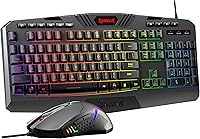
The best quiet gaming keyboards include the yesbeaut Gaming Keyboard Wired for a cushioned wrist rest, the Corsair K55 CORE RGB Membrane Wired Gaming for customizable lighting, and the Corsair K55 CORE TKL RGB Gaming Keyboard for extra mouse room.
On this page (3 sections)
The best quiet keyboard for gaming for most players is the yesbeaut Gaming Keyboard Wired, which combines quiet membrane keys, 19-key anti-ghosting and an integrated wrist rest. For customizable RGB, consider the Corsair K55 CORE; for wireless mechanical typing with silent switches, look at the SOLAKAKA KI99 Pro.
Quiet gaming keyboards can reduce keystroke noise while keeping familiar controls for movement, shortcuts and media. The picks below use quiet membrane designs or silent mechanical switches, with different layouts and connection options.
If you need a broader overview first, see our best keyboard for computer guide. Players weighing general gaming features can also compare our best keyboard for gaming picks.
Our picks at a glance
-
1

-
2
 Best for customizable lighting
Corsair K55 CORE RGB Membrane Wired Gaming
9.6/10 our score
See it on Amazon -
3
 Best for extra mouse room
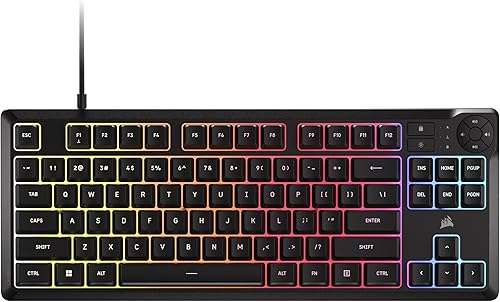
Corsair K55 CORE TKL RGB Gaming Keyboard
9.4/10 our score
See it on Amazon
- 4
 Check it
SOLAKAKA KI99 Pro Wireless Mechanical Keyboard
Best for wireless silent switches - 5
 Best for sound-reactive lightingCheck it
How we chose quiet keyboards for gaming
The best quiet gaming keyboards pair lower-noise key designs with controls that fit the way you play. We compared key type, rollover or anti-ghosting, layout, connection and useful extras such as media buttons and lighting.
Membrane keyboards are a straightforward option when you want to avoid the louder click of some mechanical switches. A mechanical board with silent switches may suit you if you want switch customization and more connection choices.
Scores weigh specs and features against the needs of someone shopping for a quieter gaming setup.
| Product | Best for | Key type | Layout | Connection | Our score |
|---|---|---|---|---|---|
| yesbeaut Gaming Keyboard Wired | a cushioned wrist rest | Membrane | 104 keys | Wired USB-A | 9.7 |
| Corsair K55 CORE RGB Membrane Wired Gaming | customizable lighting | Membrane | 104 keys | Wired USB-A | 9.6 |
| Corsair K55 CORE TKL RGB Gaming Keyboard | extra mouse room | Membrane | Tenkeyless, 87 keys | Wired USB-A | 9.4 |
| SOLAKAKA KI99 Pro Wireless Mechanical Keyboard | wireless silent switches | Mechanical, silent switches | 96%, 96 keys | Bluetooth, 2.4 GHz or USB-C | 9.2 |
| SABLUTE Quiet Gaming Keyboard | sound-reactive lighting | Membrane | 94 keys with number pad and arrow keys | Wired USB-A | 8.8 |
The best quiet keyboards for gaming
The yesbeaut is the most rounded pick for quiet typing and familiar full-size controls, while the other keyboards suit specific layout and feature needs. Choose based on how much desk space you have, whether you need wireless, and which controls matter during play.
yesbeaut Gaming Keyboard Wired: Best for a cushioned wrist rest
- Quiet membrane keys
- 19-key anti-ghosting
- 104 keys
- Integrated wrist rest
- Adjustable rainbow backlight
Quiet membrane keys and 19-key anti-ghosting suit gaming in a shared room. The integrated wrist rest and 104-key layout add comfort and familiar key placement.
Pros
- No loud click sound
- 19-key anti-ghosting
- Integrated wrist rest
Cons
- Backlight is rainbow only
- Multimedia keys are not available on Mac
The yesbeaut Gaming Keyboard Wired suits players who want quiet membrane keys and a full-size layout. Its 104 keys include a number pad, and the integrated wrist rest gives your hands a place to rest during longer sessions.
For gaming input, it has 19-key anti-ghosting and lets you swap WASD and arrow keys with a function shortcut. A Windows-key lock is also available.
Those features support common game controls without adding mechanical click noise.
The rainbow backlight has steady and breathing modes, with adjustable brightness and speed. It cannot display a single chosen color, and the multimedia keys are not available on Mac.
Choose it if you want a wired board with a wrist rest and quiet typing for a shared room. If you prefer a best gaming keyboard and mouse combo, compare bundle layouts and included controls before you buy.
Buy it for a quiet, full-size setup with a wrist rest. Look elsewhere if you want customizable per-key lighting or wireless use.
Corsair K55 CORE RGB Membrane Wired Gaming: Best for customizable lighting
- Quiet responsive membrane switches
- Ten-zone RGB
- 12-key rollover
- Four media buttons
- 300 ml spill resistance
The K55 CORE pairs quiet membrane switches with customizable ten-zone RGB lighting. Four media buttons and 12-key rollover cover common gaming and playback needs.
Pros
- Ten-zone customizable RGB
- Four dedicated media buttons
- 12-key rollover
Cons
- Full-size layout takes more desk space
- Listed compatibility is for PC and Windows
The Corsair K55 CORE RGB is a good fit if you want quiet membrane switches and customizable lighting. Its ten-zone RGB backlighting works with Corsair iCUE, so you can adjust the lighting effects across the keyboard.
Four dedicated media buttons handle playback and volume, while separate Win lock and brightness controls keep common adjustments close at hand. It also has 12-key rollover with a 1,000 Hz polling rate and 300 ml spill resistance.
Its 104-key full-size layout includes a number pad, so account for that width if your mouse area is limited. The keyboard connects by USB-A, and its stated compatibility is for PC and Windows.
Choose it if you want a familiar full-size layout with media controls and lighting options. If you prefer a direct cable setup with fewer lighting features, compare our best wired keyboard for gaming guide.
Buy it for quiet membrane typing with customizable ten-zone RGB. Skip it if you need a compact board or wireless connection.
Corsair K55 CORE TKL RGB Gaming Keyboard: Best for extra mouse room
- Quiet membrane keys
- Tenkeyless 87-key layout
- Eight-zone RGB
- 12-key rollover
- Four media buttons
The tenkeyless layout removes the number pad to leave more space for mouse movement. Quiet membrane keys, eight-zone RGB and four media buttons retain useful gaming controls.
Pros
- Compact tenkeyless layout
- Quiet membrane keys
- 12-key rollover
Cons
- No number pad
- Listed compatibility is for PC and Windows
The Corsair K55 CORE TKL suits players who want more room for mouse movement without giving up quiet membrane keys. Its tenkeyless layout has 87 keys and removes the number pad, making it shorter than a full-size board.
The eight-zone RGB lighting supports per-zone programming through iCUE. Four dedicated media buttons, a Windows lock key and a brightness key keep frequent controls accessible without a separate number pad.
It also has 12-key rollover, a 1,000 Hz polling rate and 300 ml spill resistance. Its wired USB-A connection is simple, though the stated compatibility is for PC and Windows.
Choose the TKL if your number pad sees little use and desk space matters. If you rely on that pad, the full-size Corsair K55 CORE is a more natural fit.
Buy it for a compact wired setup with media controls and quiet keys. Look elsewhere if you need a number pad or wireless connection.
SOLAKAKA KI99 Pro Wireless Mechanical Keyboard: Best for wireless silent switches
- Silent mechanical switches
- Bluetooth, 2.4 GHz and USB-C
- 96% layout
- Five noise-reducing layers
- Hot-swappable switches
This 96-key mechanical keyboard offers silent switches and three connection modes. Its gasket structure and five noise-reducing layers target quieter typing while keeping switch customization available.
Pros
- Three connection modes
- Silent switches and noise-reducing layers
- Hot-swappable switches
Cons
- More setup options than a basic wired board
- Check operating system compatibility before choosing
The SOLAKAKA KI99 Pro is the option for players who want wireless convenience and silent mechanical switches. Its 96% layout keeps 96 keys in a compact footprint, including a number pad, and a knob adjusts volume, media and lighting.
It supports Bluetooth, 2.4 GHz wireless and USB-C connections. The gasket structure, silent switches and five noise-reducing layers are designed to reduce typing noise, while hot-swappable switches let you change compatible switches later.
The keyboard also has PBT keycaps, full-key RGB and side light bars. Its software supports key programming, macros and lighting adjustments.
Check the operating system and device compatibility that matter to you before choosing it.
Choose it if you want a quieter mechanical typing feel and flexible connections. For a comparison focused on wireless options, see our best wireless keyboard for gaming guide.
Buy it for a compact wireless board with silent mechanical switches. Skip it if you prefer the simplest plug-in setup.
SABLUTE Quiet Gaming Keyboard: Best for sound-reactive lighting
- Quiet membrane keys
- 94-key compact layout
- Sound-reactive RGB light bar
- Dual control knobs
- Wired USB-A
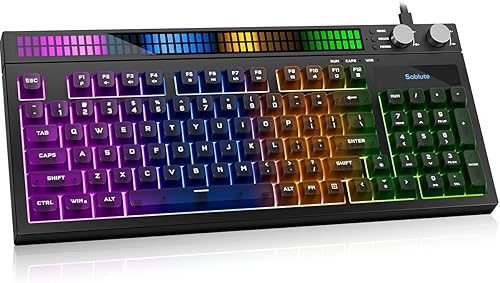
Quiet membrane keys and a compact layout suit shared rooms where a number pad still matters. A built-in sound sensor drives the light bar, and dual knobs control volume and lighting.
Pros
- Keeps a number pad in a compact layout
- Quiet membrane keys
- Sound-reactive light bar
Cons
- Printed key labels are not shine-through
- Console game support varies
The SABLUTE Quiet Gaming Keyboard suits players who want quiet membrane keys, a number pad and sound-reactive lighting in a more compact layout. Its 94 keys include separate arrow keys and a number pad.
A built-in sensor makes the RGB light bar react to audible game sound, music or voices, with eight preset effects. Two knobs control system volume and lighting.
The printed key labels are not shine-through, so room light helps you read them.
It connects with a fixed USB-A cable and is described for Windows PC and laptop, PS5, and Xbox Series X|S. Console game support varies, so confirm that the games you play support keyboard input.
Choose it if you want physical knobs and a number pad without a full-size spread. It offers fewer connection choices than a wireless board and less lighting customization than the Corsair K55 CORE.
Buy it for a compact wired layout with sound-reactive lighting. Skip it if you need shine-through legends or wireless use.
What matters when choosing a quiet gaming keyboard?
A quiet gaming keyboard should match your noise needs, key layout and connection preference. Start with key type, then check whether the rollover, controls and size suit your games.
Do quiet membrane keys work well for gaming?
Yes. Quiet membrane keys can provide responsive game input without the sharper sound some players associate with mechanical keyboards.
The Corsair K55 CORE models have 12-key rollover, while the yesbeaut has 19-key anti-ghosting.
If you are deciding between key types, our guide on are mechanical keyboards worth it explains what mechanical switches can offer. The SOLAKAKA adds silent switches and noise-reducing layers for people who still want a mechanical design.
Is a full-size, TKL or compact layout better?
Pick the layout that matches your desk and number-pad use. Full-size boards keep the number pad; TKL removes it; compact layouts can retain the pad while reducing the keyboard's overall spread.
The Corsair K55 CORE TKL is a clear option when you want more mouse room and can do without the pad. Read what is a TKL keyboard for a closer look at the layout.
Should a quiet gaming keyboard be wired or wireless?
Wired keyboards avoid battery charging and connect directly, while wireless models reduce cable clutter. The wired picks here use USB-A, and the SOLAKAKA supports Bluetooth, 2.4 GHz and USB-C.
For a quiet setup that prioritizes a cable connection, compare our best silent wired keyboard guide. Check the keyboard's listed device and operating system compatibility before choosing.
Which quiet gaming keyboard should you choose?
Choose the yesbeaut if you want a quiet full-size membrane board with a wrist rest and anti-ghosting. Pick the Corsair K55 CORE for customizable RGB and media controls, or the TKL version if you want more mouse room.
Choose the SOLAKAKA if silent mechanical switches and wireless modes matter most. The SABLUTE fits players who want a compact layout with a number pad, physical knobs and sound-reactive lighting.
Our top 3 picks at a glance
-
1
-
2
Best for customizable lighting
Corsair K55 CORE RGB Membrane Wired Gaming
9.6/10 our score
See it on Amazon -
3
Best for extra mouse room
Corsair K55 CORE TKL RGB Gaming Keyboard
9.4/10 our score
See it on Amazon
Frequently asked questions
Are membrane keyboards quieter for gaming?
Often, yes. Membrane keys generally avoid the sharp click associated with some mechanical switches, and the yesbeaut and Corsair picks use membrane designs described as quiet.
Noise still depends on how hard you type and the surface beneath the keyboard.
Can a quiet keyboard still work for responsive gaming?
Yes. A quiet keyboard can still register multiple key presses for games.
The yesbeaut has 19-key anti-ghosting, while both Corsair picks specify 12-key rollover.
Choose the rollover level and layout that fit the games you play.
Are silent mechanical keyboards completely silent?
No. Silent switches and noise-reducing layers can lower typing noise, but key movement and bottoming out can still make sound.
The SOLAKAKA KI99 Pro combines silent switches with a gasket structure and five noise-reducing layers, but your typing force and desk can affect what you hear.
Should I choose a full-size or tenkeyless quiet gaming keyboard?
Choose full-size if you use a number pad for work or games. A tenkeyless board removes the number pad to free up desk space for mouse movement.
For a compact option that keeps a number pad, the SABLUTE uses a 94-key layout.
Do quiet gaming keyboards need software?
Not always. Basic wired keyboards can offer quiet typing and lighting controls without complex setup, while customizable effects may need software.
The Corsair K55 CORE supports iCUE, and the SOLAKAKA KI99 Pro supports software for key programming, macros and RGB adjustments.