8 Best Photo Printers for Phones (November 2026)
The best photo printers for phones include the HP Sprocket Portable Photo Printer for pocket-size sticky photos, the KODAK Dock Plus 4x6 Photo Printer for desktop 4x6 prints, and the Liene M100 4x6'' Photo Printer for large phone photo batches.
On this page (4 sections)
The best photo printer for phone use is the HP Sprocket Portable Photo Printer if you want pocket-size sticky photos.
For framed prints and albums, choose the KODAK Dock Plus or a Liene M100 4x6 model.
Your first choice is print size, because the size of the finished photo will shape where it can go and how you will use it day to day.
A 2x3-inch print suits a journal, a laptop lid, a gift card or a small notice board where a sticky back is useful.
A 4x6-inch print suits a photo album, a picture frame or a printer that stays in one place at home.
Think about who the printer is for, such as a student who wants quick keepsakes or a family member who wants photos for display.
Think also about where printing will happen, from a pocket on a trip to a desk that is always plugged in.
For project ideas and printer options, see the best photo printers for scrapbooking.
Compact printers make 2x3-inch photos that fit journals, cards and small displays, while desktop models produce 4x6-inch prints closer to traditional photo sizes.
The technology inside also matters in daily use, since some models build color into ZINK paper and others use cartridges with photo paper.
That choice affects setup, storage and the supplies you will need to keep printing later.
Portability is the next practical question, because a printer that fits a bag is easier to use for a one-off moment.
A desktop model can feel steadier for regular home printing and can sit beside a phone while it charges.
For broader printer advice, use our home printer buying guide.
If portability matters most, compare these picks with our guide to the best portable printer for photos.
The right pick will match the size, place and habit of the person who will use it most often.
Our picks at a glance
-
1
 Best for pocket-size sticky photos
HP Sprocket Portable Photo Printer
9.7/10 our score
See it on Amazon -
2

-
3

- 4
 Check it
HP Sprocket 2x3 Instant Smartphone Photo Printer
Best for portable Android and iPhone prints - 5
 Check it
KODAK Step Instant Smartphone Photo Printer
Best for creative sticker projects - 6
 Check it
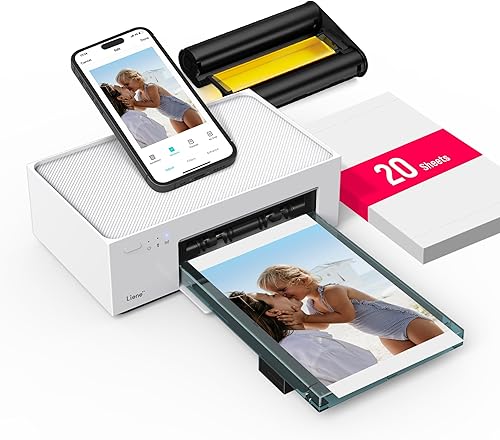
Liene M100 4x6'' Photo Printer
Best for occasional 4x6 home printing - 7
 Check it
Liene Amber M110 Bluetooth Portable Photo Printer
Best for two photo sizes - 8
 Check it
Canon Ivy 2 Mini Photo Printer
Best for simple peel-and-stick prints
Which photo printer for phone is best for most people?
The HP Sprocket is the strongest general pick for phone users who want easy 2x3-inch prints.
The KODAK Dock Plus is the better choice when your photo library belongs in albums or frames.
We compared print size, connection method, included paper, app controls, portability and the practical difference between ZINK and dye sublimation.
Our score weighs specs, features and buyer feedback against what you're shopping for.
Start with the finished photo, because a small sticky print and a framed 4x6-inch photo serve different purposes at home.
A pocket printer is easier to carry to a meetup, while a desktop printer is easier to keep ready beside a desk or shelf.
Connection matters too, since Bluetooth pairing and a built-in Wi-Fi hotspot change how a phone finds the printer.
The HP Sprocket leads the compact group because it combines a smartphone-sized body, Bluetooth 5.0, multiple-device printing and 10 sheets of sticky-backed paper.
It works with Android 5 and above and iOS 10 and above through the HP Sprocket app.
That wider phone range helps households where people use different devices and still want to share the same printer.
The app side also matters for daily use, because borders, stickers and shared albums turn a plain photo into a small gift or keepsake.
ZINK paper has no separate ink cartridge, so setup stays simple and the paper itself carries the color.
The KODAK Dock Plus leads for desktop printing because it produces 4x6-inch photos and includes an integrated smartphone dock.
It connects through Bluetooth and uses the KODAK Photo Printer app on compatible iOS and Android devices.
The dock gives the phone a clear place during printing and can charge it at the same time.
Its 4PASS dye sublimation process adds three color layers and a clear protective layer to each photo.
That finish is aimed at prints that will sit in an album or frame and be handled more often.
The trade-off is size and power, since a desktop printer needs an outlet and takes more desk space than a pocket model.
For most people, the choice comes down to whether small sticky prints or larger framed photos will be printed more often.
If small prints are the daily habit, the HP Sprocket is the safer first pick.
If the photo library is mainly for albums and frames, the KODAK Dock Plus fits that routine better.
| Product | Best for | Print size | Connection | Dimensions | Our score |
|---|---|---|---|---|---|
| HP Sprocket Portable Photo Printer | pocket-size sticky photos | 2 x 3 in | Bluetooth 5.0 and app | 3.15 x 4.63 x 0.98 in | 9.7 |
| KODAK Dock Plus 4x6 Photo Printer | desktop 4x6 prints | 4 x 6 in | Bluetooth and app | 4.5 x 8.5 x 2 in | 9.7 |
| Liene M100 4x6'' Photo Printer | large phone photo batches | 4 x 6 in | Built-in Wi-Fi hotspot and app | 9.6 | |
| HP Sprocket 2x3 Instant Smartphone Photo Printer | portable Android and iPhone prints | 2 x 3 in | Bluetooth and app | 9.5 | |
| KODAK Step Instant Smartphone Photo Printer | creative sticker projects | 2 x 3 in | Bluetooth or NFC | 9.4 | |
| Liene M100 4x6'' Photo Printer | occasional 4x6 home printing | 4 x 6 in | Built-in Wi-Fi hotspot, USB and app | 9.1 | |
| Liene Amber M110 Bluetooth Portable Photo Printer | two photo sizes | Bluetooth and app | 9.0 | ||
| Canon Ivy 2 Mini Photo Printer | simple peel-and-stick prints | 2 x 3 in | Bluetooth 5.0 and app | 4.69 x 0.79 x 3.29 in | 8.6 |
Best phone photo printers reviewed
The best photo printer for iPhone or Android depends on the size you want, the number of people printing and whether the printer will stay on a desk.
HP Sprocket Portable Photo Printer: Best for pocket-size sticky photos
- 2x3-inch sticky-backed photos
- Bluetooth 5.0
- 10 sheets of HP ZINK paper included
- Android 5 and iOS 10 compatibility
This smartphone-sized printer makes peel-and-stick 2x3-inch photos through the HP Sprocket app. It supports multiple devices and includes 10 sheets of sticky-backed ZINK paper.
Pros
- Pocket-size design
- Multiple-device printing
- Sticky-backed paper included
Cons
- Only prints 2x3-inch photos
- Print-only function
The HP Sprocket Portable Photo Printer is the easiest fit for spontaneous phone printing.
Its 2x3-inch sticky-backed photos can go into a scrapbook, journal or small display without needing separate adhesive.
The printer uses Bluetooth 5.0 and the HP Sprocket app.
Multiple devices can connect, and a personalized LED light identifies whose photo is printing.
The app also supports borders, stickers, social media photos, camera-roll photos and shared albums.
Its dimensions are 3.15 x 4.63 x 0.98 in, so it suits a pocket, purse or backpack.
The package includes 10 sheets of 2x3-inch HP ZINK sticky-backed photo paper, which uses no ink cartridge.
That paper design keeps setup short, since the color is already in the sheet rather than in a separate supply.
The sticky backing is the main appeal for people who want to place a photo on a card, page or small surface right away.
The small size also means it is a gift-friendly choice for someone who prints a few photos at a time.
Choose it when your phone library is mainly for small, shareable prints.
If your main goal is 4x6 output, move to the KODAK Dock Plus or Liene M100 instead.
KODAK Dock Plus 4x6 Photo Printer: Best for desktop 4x6 prints
- 4x6-inch photos
- 4PASS dye sublimation
- Integrated smartphone dock
- Bluetooth connection
The Dock Plus is a desktop photo printer for 4x6-inch prints from compatible smartphones and tablets. Its dock can hold a phone while charging it during printing.
Pros
- Larger 4x6-inch prints
- Integrated docking station
- Protective 4PASS finish
Cons
- Needs a power outlet
- Larger than pocket printers
The KODAK Dock Plus is the best desktop option when you want 4x6-inch smartphone photos.
Its integrated dock gives you a fixed home printing station, while Bluetooth supports wireless printing from compatible smartphones and tablets.
The printer uses 4PASS dye sublimation.
Each photo receives 3 color layers and a clear protective lamination layer, with a stated print time of about 55 seconds.
The dock can hold a phone while charging it during printing.
Its dimensions are 4.5 x 8.5 x 2 in, which is larger than pocket printers but still shaped for a compact desk setup.
That dock design suits a home routine where photos are printed in a short session rather than carried around all day.
The larger 4x6-inch format is easier to place in a frame or album than a small sticky print.
It needs a power outlet, so it is less suitable for trips than the battery-powered compact picks.
Choose this model for albums, frames, family events and everyday 4x6 printing.
Liene M100 4x6'' Photo Printer: Best for large phone photo batches
- 100 sheets and 3 cartridges
- 4x6-inch thermal dye sublimation
- Built-in Wi-Fi hotspot
- Up to 5 simultaneous connections
This Liene M100 package is built around repeated 4x6-inch printing, with 100 sheets and 3 cartridges. Its independent hotspot supports up to 5 connected devices.
Pros
- Largest included paper supply here
- 4x6-inch prints
- Multi-device hotspot
Cons
- Uses proprietary cartridges
- Larger home-use design
This Liene M100 package is the strongest choice for a larger phone photo batch.
It includes 100 sheets of 4x6-inch photo paper and 3 color cartridges, giving it a more substantial starting supply than the other options here.
Its built-in Wi-Fi hotspot lets your phone connect directly without using your home network.
Up to 5 devices can connect at the same time, which helps when several people are printing at a family event.
The printer uses thermal dye sublimation, and its laminated prints are described as resistant to water, scratches, fingerprints and fading.
The Liene app adds square borders, filters, contrast and brightness controls.
That larger supply is useful when a photo library is sorted over several sessions instead of printed one by one.
The hotspot design also helps in a room where the home network is busy or unreliable during a gathering.
Choose it when you plan to print many 4x6 photos from phones, laptops or PCs.
The trade-off is the larger home-use format and the need for Liene proprietary cartridges.
HP Sprocket 2x3 Instant Smartphone Photo Printer: Best for portable Android and iPhone prints
- 2x3-inch ZINK photos
- Bluetooth 5.3
- Sticky-backed paper
- 35 prints per charge
This purple HP Sprocket prints 2x3-inch sticky-backed photos from compatible iOS and Android devices. Its rechargeable battery is rated for 35 prints per charge.
Pros
- Very light portable design
- 35 prints per charge
- Multiple-device printing
Cons
- Small 2x3-inch format
- USB 2.0 hardware interface
The HP Sprocket 2x3 is a strong portable pick for compatible iOS and Android devices.
It prints 2x3-inch ZINK sticky-backed photos through an app, so you can make small prints without carrying ink or toner.
Bluetooth 5.3 connects the printer to a smartphone, and multiple devices can print through the setup.
The personalized LED light helps identify the active print job when friends share the printer.
The rechargeable printer weighs 0.07 kg and includes a Micro USB charging cable.
Its battery is rated for 35 prints per charge, which suits a day of small photo projects.
That light weight makes it easy to add to a bag for travel, school or a weekend visit.
The sticky-backed format works well for journals, cards and other small craft projects where a photo needs to sit flat.
Choose it when portability and battery life matter more than print size.
The 2x3-inch format is useful for stickers and journals, but it will not replace a 4x6 desktop photo printer.
KODAK Step Instant Smartphone Photo Printer: Best for creative sticker projects
- 2x3-inch ZINK prints
- Bluetooth or NFC
- Editing app
- 25 prints per charge
The KODAK Step combines 2x3-inch peel-and-stick prints with an app for collages, filters, borders, stickers and text. Its rechargeable battery is rated for 25 photos per charge.
Pros
- Bluetooth and NFC options
- Creative editing tools
- Lightweight design
Cons
- Smaller print format
- Lower stated print count per charge than HP Sprocket 2x3
The KODAK Step is best for creative phone projects that need more than a plain print.
Its app supports collages, filters, borders, stickers and text, while the 2x3-inch ZINK paper has a peel-and-stick backing.
You can connect compatible iOS and Android devices through Bluetooth or NFC.
The printer weighs 0.07 kg, and its built-in rechargeable battery is rated for 25 photos on a full charge.
The package includes a Micro USB charging cable, a starter pack of KODAK ZINK photo paper, a quick start guide and a limited warranty.
ZINK paper contains embedded dye crystals, so the printer does not need separate ink, toner or ribbon replacements.
That design suits someone who wants to print a small photo and place it on a page or card without extra supplies.
The NFC option can make starting a connection feel simpler for a casual user than a longer pairing process.
Choose it for travel, scrapbooking and social-media photo projects.
Pick an HP Sprocket instead if the stated 35-print charge capacity is more useful to you.
Liene M100 4x6'' Photo Printer: Best for occasional 4x6 home printing
- 20 sheets and 1 cartridge
- 4x6-inch thermal dye sublimation
- Built-in Wi-Fi hotspot
- iOS, Android, Windows and PC compatibility
This Liene M100 package is a smaller starting set for home 4x6 printing, with 20 sheets and 1 cartridge. It connects through its own hotspot and supports phones, laptops and PCs.
Pros
- 4x6-inch output
- 20 sheets included
- Supports phones and computers
Cons
- Smaller starter supply
- Heavier than pocket models
This Liene M100 is a good fit for occasional 4x6 home printing.
It includes 20 sheets of photo paper and 1 cartridge, so it gives you the larger photo format without the 100-sheet package.
The built-in Wi-Fi hotspot connects directly to phones and supports up to 5 devices.
It also works with laptops and PCs, with USB support for computer connections.
Thermal dye sublimation places the color into the photo, and the final protective layer is designed to resist water, scratches and fading.
The app can add frames and filters, print ID photos and show paper or cartridge status.
That smaller starter supply suits a household that prints a few photos when needed rather than a full album in one sitting.
The direct hotspot can be handy when a phone needs to connect without relying on a shared home network.
Choose this version if you want to start with a smaller supply.
The 100-sheet Liene package is better for a large photo library, while this one suits lighter home use.
Liene Amber M110 Bluetooth Portable Photo Printer: Best for two photo sizes
- 4x6-inch and 3x3-inch output
- 80 sheets and 2 cartridges
- Bluetooth connection
- Dual paper tray
The Amber M110 handles standard 4x6-inch photos and 3x3-inch square sticker sheets through its dual tray. The package includes 80 sheets and 2 cartridges.
Pros
- Two paper sizes
- Bluetooth pairing
- 80 sheets included
Cons
- Uses Liene 4x6 and 3x3 cartridges
- Heavier than compact 2x3 printers
The Liene Amber M110 is the most flexible choice for buyers who want both 4x6 photos and 3x3-inch square stickers.
Its dual paper tray accepts the 2 formats, and the package includes 60 4x6 sheets, 20 square sticker sheets and 2 cartridges.
Bluetooth pairing is stated to take 13 seconds.
The Liene app adds a Polaroid border, filters, contrast and brightness controls, while the printer supports multiple simultaneous connections from compatible smartphones, tablets, laptops and PCs.
Its thermal dye sublimation prints have a laminated surface described as resistant to water, scratches, fingerprints and fading.
The printer uses Liene 4x6 and 3x3 cartridges.
That dual tray design means one printer can handle a standard photo and a smaller square sticker without swapping to a different machine.
The mix of paper in the box helps a buyer test both formats before deciding which one is used more often.
Choose it when a single print size feels limiting.
It weighs 2.9 lb, so it is portable in the broad sense but less pocket-friendly than the HP, KODAK Step or Canon Ivy 2.
Canon Ivy 2 Mini Photo Printer: Best for simple peel-and-stick prints
- 2x3-inch ZINK prints
- Bluetooth 5.0
- iOS and Android app
- 10 sheets and Smart Sheet included
The Canon Ivy 2 prints 2x3-inch peel-and-stick photos from compatible iOS and Android devices. ZINK paper contains the color crystals, so the printer needs no ink.
Pros
- No ink cartridges
- Compact pink design
- Improved photo contrast and sharpness
Cons
- Only prints 2x3-inch photos
- Starter pack has 10 sheets
The Canon Ivy 2 is a simple choice for 2x3-inch peel-and-stick photos from compatible iOS and Android smartphones.
It uses ZINK technology, with color crystals embedded in the paper instead of a separate ink cartridge.
Bluetooth 5.0 connects the phone to the Canon Mini Print app.
The app lets you choose and customize photos, while the printer is small enough to carry for casual projects.
Its dimensions are 4.69 x 0.79 x 3.29 in, and it weighs 8.8 oz.
The included media is a Canon ZINK pack with 10 sheets and 1 Smart Sheet, plus a USB charging cable.
Canon describes improved skin tones, contrast and sharpness for the IVY 2.
That focus on portrait detail can matter when a photo is mainly a face or a group shot at small size.
The peel-and-stick backing makes it easy to add a photo to a card, page or small display.
Choose it when you want a small pink printer with no ink cartridges.
Choose the HP Sprocket if you prefer its multiple-device features.
How to choose the best photo printer for phone photos
The best photo printer for phone photos starts with the print size you will actually use. Choose 2x3-inch ZINK models for stickers and small keepsakes, or choose a 4x6-inch dye-sublimation printer for albums and frames.
Should you choose a 2x3 or 4x6 photo printer for iPhone?
Choose a 2x3-inch printer if you want small prints for journals, cards, scrapbooks or peel-and-stick displays. The HP Sprocket, KODAK Step and Canon Ivy 2 all use this compact format.
Choose 4x6 inches if you want a standard photo size for albums or frames. The KODAK Dock Plus and both Liene M100 packages focus on 4x6 printing, while the Amber M110 supports both 4x6 and 3x3-inch paper.
Our guide to the best photo printer for iphone 4x6 focuses on the larger format and helps narrow the choice between desktop models.
Is Bluetooth or Wi-Fi better for a phone photo printer?
Bluetooth is convenient for a direct phone connection and appears in the HP Sprocket, KODAK Dock Plus, KODAK Step, Amber M110 and Canon Ivy 2. The Liene M100 models use a built-in Wi-Fi hotspot, so your phone connects directly to the printer without relying on your home network.
If you want a broader Bluetooth comparison, see our guide to the best bluetooth photo printer for iphone. Check the app and phone compatibility before printing, especially when several people will connect.
How much paper should you get with a phone printer?
A small starter pack suits occasional prints, while a larger paper bundle makes more sense for a photo library or group event. The Canon Ivy 2 includes 10 sheets, the HP Sprocket includes 10 sheets, and the smaller Liene M100 includes 20 sheets.
The larger Liene M100 package includes 100 sheets and 3 cartridges. The Amber M110 includes 80 sheets across 4x6 and square sticker formats, so it suits buyers who want to switch between sizes.
How do you set up a phone photo printer?
Start by charging or powering the printer, loading the correct paper and installing the brand's app.
Then connect your phone through Bluetooth or the printer's built-in Wi-Fi hotspot, select a photo and check the crop before printing.
Keep the paper aligned as the printer instructions show.
For dye-sublimation models, install the matching cartridge, and for ZINK models, use the correct ZINK paper pack.
Check that the phone system and app version are compatible before a group session, since a failed pairing can slow a shared queue.
Store spare paper in its package and keep the printer clean, because dust and misaligned sheets can affect a small print run.
For other printer types, our guide to the best monochrome laser printer explains why laser printers are aimed at document printing rather than color phone photos.
If you are comparing ink supplies, see which Epson EcoTank printers use 502 ink.
How should you care for a phone photo printer?
Store photo paper in its intended package and keep the printer away from dust when it is not in use. If a Liene print shows smudges, its instructions say to clean the print head promptly.
Use the matching paper and cartridge combination for the printer. The Amber M110, for example, is compatible with Liene 4x6 and 3x3 cartridges, while the Liene M100 models use Liene proprietary cartridges.
Best photo printer for phone: final verdict
The HP Sprocket Portable Photo Printer is the best photo printer for phone users who want a pocket-size 2x3-inch sticky print.
Pick the KODAK Dock Plus for desktop 4x6 photos, the larger Liene M100 package for repeated batches, or the Amber M110 when you need both 4x6 and 3x3 output.
The final choice should follow the way photos will actually be used after printing.
A sticky 2x3-inch photo is easy to share, place in a journal or add to a card in the moment.
A 4x6-inch photo is easier to frame, file in an album or keep as a lasting family print.
A printer that stays at home can keep a steady routine, while a pocket printer can travel with a phone all day.
That is why the HP Sprocket suits most casual phone users, while the KODAK Dock Plus and Liene models suit a larger home output.
Check the included paper and cartridge supply before buying, since a small starter pack will run out faster during a busy week.
Also check phone compatibility and connection type, especially if several people will print from different devices.
For a fully portable setup, compare the compact choices in our guide to the best portable photo printer for iphone.
If your needs shift from photos to document scanning, our guide to the best receipt scanner with OCR software covers a different kind of phone-friendly workflow.
Our top 3 picks at a glance
-
1
Best for pocket-size sticky photos
HP Sprocket Portable Photo Printer
9.7/10 our score
See it on Amazon -
2
-
3
Frequently asked questions
What is the best photo printer for phone photos?
The HP Sprocket Portable Photo Printer is the best photo printer for phone users who want pocket-size 2x3-inch sticky photos. Choose the KODAK Dock Plus or a Liene M100 when you want larger 4x6-inch prints for albums, frames or home display.
What is the best photo printer for iPhone?
The best photo printer for iPhone depends on print size. Choose the HP Sprocket or Canon Ivy 2 for 2x3-inch peel-and-stick photos, or choose the KODAK Dock Plus and Liene M100 for 4x6-inch prints from compatible iOS devices.
Are phone photo printers inkjet printers?
Not always. The HP Sprocket, KODAK Step and Canon Ivy 2 use ZINK paper with embedded color crystals.
The KODAK Dock Plus and Liene models use dye sublimation with color cartridges and photo paper.
Can a phone photo printer print 4x6 photos?
Yes. The KODAK Dock Plus, both Liene M100 packages and the Liene Amber M110 print 4x6-inch photos.
Compact models such as the HP Sprocket, KODAK Step and Canon Ivy 2 are designed for smaller 2x3-inch output.



