How to Choose a Keyboard Stand with a Wrist Rest
Match the stand’s tilt and height to your keyboard and desk, then place the wrist rest where it supports your palms without forcing your wrists to bend. Check the keyboard’s footprint and whether the rest moves with the stand before you buy.
On this page (9 sections)
- What should you match before choosing a keyboard stand with wrist rest?
- Does a wrist rest belong under your wrists while typing?
- How do height and tilt affect comfort?
- Should you choose an attached rest or a separate pad?
- Which wrist rest shape and material should you consider?
- How can you check a setup at your desk?
- Which stand and wrist-rest setup suits your use?
- What should you check before buying?
- How do you choose a keyboard stand with wrist rest?
A keyboard stand with wrist rest should hold your keyboard at a comfortable height and angle while giving your hands a place to rest between keystrokes. Match the stand and rest to your keyboard’s dimensions, desk height and typing posture.
The phrase can mean a raised keyboard platform with an attached wrist pad, or a separate keyboard stand used beside a wrist rest. Check which setup you’re considering: a standalone wrist rest does not raise or tilt the keyboard.
What should you match before choosing a keyboard stand with wrist rest?
Match keyboard width, stand height and tilt, and wrist-rest position before choosing a setup. A mismatch can leave the keyboard unstable or put your hands at an awkward angle.
Measure the keyboard’s width and depth, including any feet or overhanging edges. Compare those measurements with the stand’s usable surface, not just its outside dimensions.
Check how much the stand raises the keyboard and whether its angle can be adjusted. If the stand has fixed legs, try to find its height and tilt measurements before deciding it fits your desk.
The rest should sit directly in front of the keys, close enough for your palms to reach without stretching. Look for an attachment or shape that keeps it from drifting away from the keyboard during normal typing.
If you’re still choosing the keyboard itself, start with our best keyboard for computer guide. Keyboard size and layout affect how much stand space and wrist-rest width you need.
Does a wrist rest belong under your wrists while typing?
A wrist rest is mainly a place to rest your hands between typing, rather than a surface to press your wrists into while you type. Keep your hands relaxed and avoid holding them at a sharp upward or downward angle.
A raised stand can change the angle of your hands, so check your posture after adjusting it. Your shoulders should be relaxed, elbows near your sides and forearms roughly level with the keyboard.
If the rest feels too high, too low or too far away, move or remove it and reassess. A soft surface does not make an awkward keyboard position comfortable.
For more advice on choosing a separate pad, see our best keyboard wrist rest guide. It covers the wrist-rest choice apart from the stand.
How do height and tilt affect comfort?
The keyboard’s position relative to your elbows matters more than the stand’s height by itself. Compare wrist rests for ergonomic keyboards when choosing support for that setup.
Choose a setup that lets your hands reach the keys without lifting your shoulders or bending your wrists sharply.
A positive tilt raises the far edge of the keyboard. This may suit some desk arrangements, but it can also angle the keys away from a neutral wrist position.
Test the stand at the lowest or flattest setting first if it offers adjustment.
A negative tilt lowers the far edge and can keep the keys closer to level with your forearms. The right angle depends on your desk and chair, so adjust in small steps and notice how your hands feel.
If a stand has no angle adjustment, check its fixed tilt and height before ordering. A separate wrist pad can cushion the desk edge, but it cannot correct a keyboard angle that doesn’t suit you.
Should you choose an attached rest or a separate pad?
Choose an attached rest when you want the keyboard and support to stay aligned as one unit. Choose a separate pad when you need to adjust its position or use it with more than one keyboard.
An attached pad may be part of a raised platform, but confirm that the stand supports your keyboard’s size and weight. Check whether the pad’s height leaves enough room for your hands and whether it can be replaced or removed.
A separate rest is easier to move between a desktop keyboard and a laptop. It also lets you position the pad independently, though you may need to reposition it if it slides.
For combined keyboard and mouse support, compare the options in our best wrist rest for keyboard and mouse guide. A set can help keep both pads at a similar height.
Which wrist rest shape and material should you consider?
Choose a width that covers your normal hand position and a depth that fits the space between you and the keyboard. Foam and gel can cushion your palms, while a non-slip base can help keep the pad in place.
A full-width rest is useful when you move your hands across most of the keyboard. A shorter pad may suit a compact layout, but check that it reaches both hands in your usual position.
Cover fabric can affect how the surface feels against your skin. The products below use spandex, rubber or Lycra covers, with memory foam fill listed for each; compare dimensions and cleaning guidance where available.
What should you look for in a keyboard wrist rest with stand?
A keyboard wrist rest with stand should fit the keyboard and remain aligned when you type. Check whether the stand and wrist pad are attached, sold as a set, or separate pieces.
Some setups include one pad for the keyboard and another for the mouse. If you use both, compare the pads’ heights and positions so the hand support feels consistent across your desk.
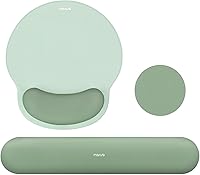
The Gimars set includes a keyboard rest and a mouse rest, each with a spandex cover over memory foam. Its keyboard pad is 1.2 in thick, so compare that height with your keyboard’s front edge before pairing it with a stand.
The HyperX rest is designed to fit full-size keyboards. It has memory foam, a rubber cover and anti-fray stitching, but it does not include a keyboard stand.
The Vaydeer keyboard pad measures 17.32 x 3.15 x 0.83 in, and the set includes a separate mouse support. Its listed shape is concave, so check whether that profile suits where your hands naturally rest.
How can you check a setup at your desk?
Check the setup while seated in your usual typing position. The keyboard should feel steady, your shoulders should stay relaxed and your hands should reach the keys without strain.
- Set your chair and desk as you normally use them.
- Place the keyboard stand where you intend to type.
- Adjust the keyboard angle, if the stand allows it.
- Put the rest in front of the keyboard and type for a short period.
- Notice whether your wrists bend, your shoulders lift or the rest shifts.
- Change one position at a time and check again.
Measure the desk depth as well as the stand. The stand, keyboard and wrist pad all need space, and a mouse pad may need room beside them.
If you use a laptop, check that the screen remains comfortable to view after raising the keyboard. You may need a separate laptop riser or external display to avoid looking down.
Which stand and wrist-rest setup suits your use?
Pick the setup based on keyboard size, desk space and how often you change devices. An attached solution can simplify alignment, while a separate rest offers more freedom to reposition it.
For a full-size desktop keyboard, check the stand’s usable width first. A full-width wrist rest such as the HyperX is 18 in long, while the Gimars and Vaydeer keyboard pads are about 17 in long.
For a compact keyboard, a full-size pad may extend beyond the keys. That can still work if it fits your desk and hand position, but measure before buying.
For a laptop desk, a separate rest can move between the built-in keyboard and an external keyboard. Our best keyboard wrist rest for laptop guide focuses on portable setups.
For gaming, consider whether the pad stays in place during frequent key presses and whether its width matches your keyboard. Our best keyboard wrist rest for gaming guide compares gaming-oriented options.
If you want to change your typing position with a split layout, see our best ergonomic split keyboard guide. For gaming keyboard choices, compare our best keyboard for gaming guide.
What should you check before buying?
Confirm the stand dimensions, adjustment range and wrist-rest placement before ordering. If a detail is missing, check with the seller rather than guessing how it will fit.
Use this checklist:
- Keyboard width and depth, including its feet
- Stand surface size and weight support
- Stand height and tilt, fixed or adjustable
- Wrist-rest length, depth and thickness
- Whether the rest attaches to the stand or sits separately
- Desk depth and available mouse space
- Return terms in case the setup does not fit your posture
Wooden rests have a firmer feel than foam-filled pads and may suit buyers who prefer a solid surface. See our best wood keyboard wrist rest guide for that style.
A keyboard rest can cushion your hands, but it cannot make every stand or typing position comfortable. If your wrists feel strained, adjust the keyboard height and angle, move the rest, or take a break.
How do you choose a keyboard stand with wrist rest?
Choose a keyboard stand with wrist rest by matching its height and tilt to your seated posture, then checking that the pad fits your keyboard and desk. Pick an attached rest for a fixed arrangement, or a separate pad if you want to change positions or devices.
Compare the best keyboard wrist rest options if you already have a stand, and choose a combined keyboard and mouse set if both hands need a place to rest.