9 Best Ergonomic Keyboard Tray for Desk (November 2026)
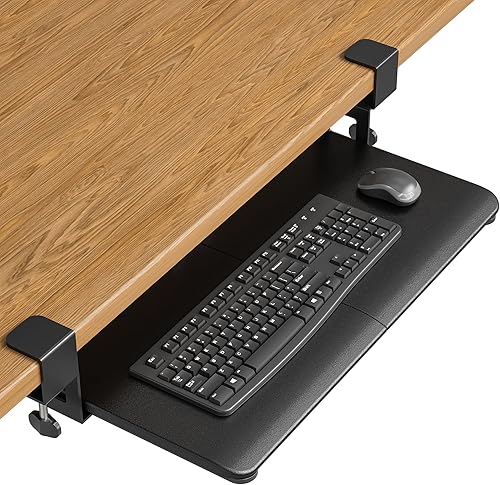
The best ergonomic keyboard trays for desks include the VIVO Black Extra Large Clamp-on 34 x for wide workstations, the BONTEC Under Desk Keyboard Tray for standard keyboards, and the VIVO Black Clamp-on 27 x for medium desks.
On this page (7 sections)
- The best ergonomic keyboard trays for desks
- How do you choose an ergonomic keyboard tray for a desk?
- Which keyboard tray size fits a full-size keyboard?
- Are clamp-on keyboard trays stable?
- Can a keyboard tray work with an all-in-one computer?
- How should you install and care for an ergonomic keyboard drawer?
- Which ergonomic keyboard tray should you choose?
The best ergonomic keyboard tray for desk setups is the VIVO Black Extra Large Clamp-on 34 x 11 in Keyboard Tray. Its wide surface, 11 lb capacity, smooth extension and ergonomic typing angles make it the best fit for a roomy desk with a clear, square edge.
Choose BONTEC if you want a standard-size platform with a higher desk-thickness limit. Pick HUANUO if height, swivel and tilt matter more than simple installation, or choose AODK if you need a complete electric standing desk with a built-in tray.
We compared the stated dimensions, mounting systems, adjustment ranges and intended uses. Our score weighs specs, features and buyer feedback against what you're shopping for.
If you are still choosing the keyboard itself, our guide to the best keyboard for computer covers layouts, connection types and everyday use.
Our picks at a glance
-
1

-
2
-
3

- 4
 Check it
HUANUO Under Desk Keyboard Tray
Best for adjustable positioning - 5
 Check it
EUREKA ERGONOMIC Height Adjustable Mouse & Keyboard
Best for beam-equipped desks - 6
 Check it
AODK 55 Inch Standing Desk with Drawers
Best for a complete standing setup - 7
 Check it
Zontera Ergonomic Keyboard Tray Under Desk
Best for thick desktops - 8
 Check it
Zontera Ergonomic Mouse & Keyboard Tray Under
Best for compact desks - 9
 Check it
AX WABER Keyboard Tray Under Desk Pull Out
Best for basic pull-out use
The best ergonomic keyboard trays for desks
The best ergonomic keyboard tray for desk use depends on your available width, desk thickness, keyboard size and preferred typing height. Measure the mounting area before comparing slide action or tilt.
VIVO Black Extra Large Clamp-on 34 x: Best for wide workstations
- 33.9 x 11 in tray
- 39.4 in total clamp length
- 11 lb capacity
- 8.5 in extension
The wide tray gives a keyboard, mouse and small accessories room below the desk. Its clamp requirements make it best for a level, square-edged desk with enough clear width.
Pros
- Widest tray here
- 11 lb capacity
- No drilling required
Cons
- Needs 39.4 in of clamp-to-clamp space
- Not for beveled edges
VIVO's Extra Large Clamp-on tray is the strongest choice when you have plenty of clear desk width. The 33.9 x 11 in surface leaves room for a keyboard, mouse and other small accessories below the desktop.
The tray extends up to 8.5 in from the desk edge and supports up to 11 lb. That combination suits a full-size keyboard setup where you want to clear the desktop without giving up mouse space.
The adjustable C-clamps attach to desks up to 1.25 in thick. You need 39.4 in of total clamp-to-clamp space, a level underside, a clean square edge and no crossbars or supports at the mounting points.
The tray is not compatible with beveled edges. Measure the whole clamp span, not only the 33.9 in tray surface, before ordering.
Choose it for the widest work area in this roundup. Its size is a poor match for narrow desks, corner obstacles or desktops with a beveled lower edge.
BONTEC Under Desk Keyboard Tray: Best for standard keyboards
- 25.6 x 11.8 in platform
- 11 lb capacity
- Fits desks up to 1.97 in thick
- Protective anti-skid padding
BONTEC balances a standard keyboard and mouse footprint with a higher desk-thickness limit than several clamp-on alternatives. It is not intended for curved edges, support beams, vertical mice or split ergonomic keyboards.
Pros
- 11 lb capacity
- Up to 1.97 in desk thickness
- No-drill installation
Cons
- May not fit oversized keyboards
- Needs a clear underside
BONTEC is the best ergonomic keyboard desk tray for a standard keyboard and mouse. Its 25.6 x 11.8 in platform is smaller than the largest VIVO but still provides enough depth for most standard setups.
The C-clamps fit desks up to 1.97 in thick and support up to 11 lb. Protective pads help reduce scratches while the tray pulls out for use and slides below the desk afterward.
Plan on at least 31.3 in of width and 11.8 in of depth beneath the desktop. The underside must be flat and clear, with no curved, rounded or beveled edge and no support beam in the clamp area.
BONTEC specifically notes that vertical mice, oversized gaming keyboards and split ergonomic keyboards may need extra clearance. Compare your equipment with the platform before choosing it.
Choose BONTEC when you want a balanced tray for a common keyboard and mouse. It is less suitable when you need a very large surface or an unusual keyboard layout.
VIVO Black Clamp-on 27 x: Best for medium desks
- 26.8 x 11 in tray
- 11 lb capacity
- 8.5 in extension
- Adjustable C-clamps
This smaller VIVO tray keeps the same clamp-on format and ergonomic typing angle as the larger model while needing less total desk width. It suits a regular keyboard, mouse and a medium-size desk.
Pros
- Smaller footprint than the 34 in model
- 11 lb capacity
- Slides under the desk
Cons
- Not for beveled edges
- Requires 32.5 in of clamp-to-clamp space
The VIVO 27 in tray fits a medium desk that cannot spare the 39.4 in span required by the larger model. Its 26.8 x 11 in surface holds a keyboard, mouse and small accessories below the desktop.
Like the larger VIVO, it extends up to 8.5 in and supports up to 11 lb. The sliding tray creates storage space when pushed under the desk, while the ergonomic angle is intended to reduce wrist and shoulder stress.
The clamp-to-clamp length is 32.5 in, and the desk can be no thicker than 1.25 in. A level underside, clean square edge and clear mounting area are required for the clamps to secure properly.
This tray is not compatible with beveled edges. Check for crossbars and other supports before assembly because they can block the clamp positions.
Pick it when you want VIVO's wide 11 in depth in a smaller overall footprint. Choose the larger VIVO if your desk has the width and you want more room for accessories.
HUANUO Under Desk Keyboard Tray: Best for adjustable positioning
- 25 x 9.84 in tray
- 6.3 in height adjustment
- 180-degree swivel
- 6-degree up and 22-degree down tilt
HUANUO is the most adjustable traditional tray here, with height movement, swivel and tilt. Its clearance rules are more involved, so measure crossbars, side obstacles and desk thickness first.
Pros
- Height adjustment for sitting or standing
- 180-degree swivel
- Included wrist rest
Cons
- Needs careful clearance planning
- Knob must be tightened before typing
HUANUO is the best choice when a fixed keyboard drawer does not give you enough positioning control. The tray adjusts 6.3 in in height, swivels 180 degrees and tilts 6 degrees up or 22 degrees down.
Its 25 x 9.84 in surface fits keyboards up to 17.3 x 5.5 in plus mouse space. An included wrist rest adds a dedicated support surface, while the tray slides below the desk when you need more desktop room.
Clearance planning is more detailed than with the simple clamp-on models. Check for a crossbar, allow 14.17 in from the desk edge to a crossbar, or 16.22 in for full slide-under movement.
Desk sides also need 25 in of clearance, or 35.4 in if you rotate the tray.
The tray can support sitting and standing changes, but you must tighten the knob before typing. Its lowest connector height is 7.48 in, so compare that with your legroom.
Choose HUANUO for adjustable positioning and corner-desk flexibility. It may be too involved if you only need a basic pull-out platform.
EUREKA ERGONOMIC Height Adjustable Mouse & Keyboard: Best for beam-equipped desks
- 28.3 x 10.2 in tray
- 360-degree swivel
- 43-degree vertical tilt
- 6.6 lb capacity
EUREKA ERGONOMIC uses a screw-mounted design that can fit desks with beams, unlike many clamp-on trays. It offers wide positioning adjustment, but the 6.6 lb capacity and mounting requirements matter.
Pros
- Fits desks with beams
- 360-degree swivel
- 43-degree tilt
Cons
- Not for glass, stone or plastic desks
- 6.6 lb capacity
EUREKA ERGONOMIC suits a desk where beams make clamp-on trays difficult. Its 28.3 x 10.2 in tray mounts with self-tapping screws and works with wood, MDF or similar materials.
The tray swivels 360 degrees and tilts 43 degrees vertically. A lip helps support the wrist and keeps the keyboard from sliding when tilted, while the tray can also hold a small laptop, iPad or other devices within its 6.6 lb capacity.
The desk must be at least 0.71 in thick, and the mounting bracket is 17.8 in deep. The required desk dimensions are at least 20 x 39.5 x 29.1 in, with enough legroom and no interference from desk motors.
Plastic, stone and glass desktops are not compatible. The wrist rest and mouse pad are removable, which gives you more control over the surface.
Pick EUREKA ERGONOMIC when swivel and tilt matter or a beam blocks a C-clamp. Choose a clamp-on model if you do not want screw mounting.
AODK 55 Inch Standing Desk with Drawers: Best for a complete standing setup
- 29.9 to 46.1 in height range
- 3 memory presets
- Built-in keyboard tray
- 2 fabric drawers
AODK is a full standing desk rather than an add-on tray. It combines a keyboard tray with a monitor shelf, drawers, cable management, LED lighting and height presets for a complete workstation.
Pros
- Electric height adjustment
- Built-in keyboard tray
- Storage and power features
Cons
- Requires replacing or adding a full desk
- Needs room for a 55 in surface
AODK is the best ergonomic keyboard drawer option when you need a full standing workstation rather than an add-on tray. The 55 in rustic brown desk includes a keyboard tray, monitor shelf, cable management tray and 2 fabric drawers.
Electric height adjustment runs from 29.9 to 46.1 in, with 3 memory presets for repeatable sitting and standing positions. The metal frame and alloy steel legs support the desk structure, while the engineered wood hutch provides the monitor shelf.
The built-in power section has 3 outlets and 2 USB ports. LED lighting offers 20 modes, adding a visual feature that separate keyboard trays do not provide.
This desk requires more room than a standalone drawer. Its dimensions are 55 x 21.25 x 30.9 in, so measure the room and check the keyboard tray size before assembly.
Choose AODK if you are building a new sit-stand setup with storage and power. It is not the right choice if you only want to add a tray to an existing desk.
Zontera Ergonomic Keyboard Tray Under Desk: Best for thick desktops
- 25.6 x 11.8 in board
- Up to 2.76 in desk thickness
- 7.8 in extension
- 31.5 in clamp-to-clamp length
Zontera gives thick desktop owners a broad keyboard and mouse surface with no-drill mounting. Its total clamp length still needs 31.5 in of clear desk width.
Pros
- Fits thicker desks
- Built-in back baffle
- Non-slip clamp pads
Cons
- Needs 31.5 in of width
- No stated weight capacity
Zontera's larger tray is a good match for a thick desktop that still has a clear underside. The 25.6 x 11.8 in board provides room for a keyboard, mouse and small accessories, with a 31.5 in clamp-to-clamp span.
Its dual C-clamps fit desktops up to 2.76 in thick, which is the highest stated thickness limit among the clamp-on trays here. Non-slip pads help protect the desk, and the back baffle helps stop the keyboard from sliding.
The tray extends up to 7.8 in from the desk edge. Its no-drill installation can be useful for renters or anyone who wants to avoid permanent changes, but the desktop must still have enough clear width for both clamps.
Choose it for a thick desk and a standard-size keyboard. Compare the clamp span with your desk before ordering, and do not assume the 25.6 in board is the only space required.
Zontera Ergonomic Mouse & Keyboard Tray Under: Best for compact desks
- 20 x 11.8 in board
- Up to 2.76 in desk thickness
- 7.8 in extension
- 25.9 in clamp-to-clamp length
This smaller Zontera tray needs only 25.9 in of clamp-to-clamp desk space. It is a practical match for compact work areas using a smaller keyboard and mouse.
Pros
- Shortest clamp span here
- Fits thick desktops
- No-drill clamps
Cons
- Less room for oversized keyboards
- No stated weight capacity
The smaller Zontera tray is the best ergonomic keyboard drawer for a compact desk. Its 20 x 11.8 in board uses only 25.9 in of clamp-to-clamp width, making it easier to place in a narrow workstation.
It has the same stated 2.76 in desk-thickness limit, dual C-clamps, non-slip pads, back baffle and 7.8 in extension as the larger Zontera. That taller clamp range can help with a thicker desktop, but it does not solve a narrow mounting area on its own.
The shorter board leaves less room for oversized keyboards or extra accessories. A standard keyboard plus a mouse will use most of the width, so cables and any wrist support need careful placement.
Measure your keyboard and mouse together before choosing this model. A compact surface can work well for a small keyboard, but it gives you less flexibility than the 25.6 in tray.
Set up takes care with the pads and clamps, so tighten both sides evenly and check that the tray slides clear of legs. Choose it when desk width is the main limit, and move up to the larger Zontera if your keyboard needs more horizontal room.
AX WABER Keyboard Tray Under Desk Pull Out: Best for basic pull-out use
- 27.3 x 8.3 in tray
- 11 lb capacity
- 5.7 in extension
- Fits desks up to 1.9 in thick
AX WABER keeps the design simple with a pull-out platform, adjustable C-clamps and an 11 lb capacity. Its 8.3 in tray depth is narrower than most options here.
Pros
- 11 lb capacity
- No drilling required
- 5.7 in extension
Cons
- Narrower tray depth
- Not for beveled edges
AX WABER is a straightforward pull-out tray for buyers who want a simple under-desk keyboard drawer. Its 27.3 x 8.3 in platform supports up to 11 lb and extends up to 5.7 in from the desk edge.
The adjustable C-clamps fit desks up to 1.9 in thick, with a recommended desktop mounting range between 0.3 and 1.75 in. The complete clamp span is 32.5 in, so measure the desk edge rather than relying only on the tray width.
That 5.7 in extension is shorter than several other trays in this roundup. It still pulls out enough for typing, yet a keyboard placed farther from the edge may feel closer to your legs.
Its narrower 8.3 in depth may suit a regular keyboard and mouse, but it leaves less room than the 9.84 to 11.8 in trays above. A wrist rest, large mouse or extra accessories can crowd the surface quickly.
The tray is not suitable for beveled edges or reinforcing tubes that block the clamps. Check the underside before assembly and keep the slide path clear of cables.
Choose AX WABER for basic pull-out storage and a clear 11 lb capacity. Pick BONTEC or a VIVO if your setup needs more depth.
How do you choose an ergonomic keyboard tray for a desk?
The best ergonomic keyboard tray for desk use should fit the desk first and the keyboard second. Check the mounting space, desktop thickness, underside clearance, tray dimensions and the position where your elbows and wrists will rest.
Start with these measurements:
- Desk thickness at the mounting edge
- Clear width between legs, supports and other obstacles
- Distance from the edge to any crossbar
- Available tray depth below the desktop
- Keyboard, mouse and wrist-rest dimensions
- Legroom with the tray pulled out
- Space needed for the tray to slide under the desk
Clamp-on trays need a level underside and a clear edge. VIVO, BONTEC, Zontera and AX WABER all require careful checking around the clamp area, while EUREKA ERGONOMIC uses screw mounting and can work with beams on compatible wood or MDF desks.
For more wrist support options, compare a best keyboard wrist rest with the tray's built-in lip or included wrist rest. A tray changes keyboard height, but it does not replace a properly sized wrist support when your setup needs one.
Which keyboard tray size fits a full-size keyboard?
A tray about 25 to 28 in wide and 9.8 to 11.8 in deep fits many standard keyboard and mouse setups, but you should measure your own equipment. The BONTEC, VIVO 27 in, HUANUO and EUREKA ERGONOMIC trays all provide useful room in that range.
Large boards are better when you use a wide keyboard, a separate mouse or small desk accessories. The VIVO Extra Large offers a 33.9 x 11 in surface, while the Zontera compact model offers only 20 x 11.8 in.
Split ergonomic keyboards may need more width or unusual clearance. BONTEC warns that its surface may not suit split ergonomic keyboards, so compare the full keyboard footprint and cable position before choosing a drawer.
A wrist rest can change the required depth. See our guide to best wrist rest for keyboard and mouse if you need support for both devices.
Are clamp-on keyboard trays stable?
Clamp-on keyboard trays can be stable when the desk edge, underside and thickness match the tray requirements. Stability depends on installation conditions, not only on tray material or width.
A square edge lets the clamp sit flat along the desktop. A rounded or beveled profile reduces contact, so the same tray can feel firm on one desk and loose on another.
Keep the mounting area clear of crossbars, reinforcing tubes and cable channels. Those parts can block the clamp jaws or tilt the tray before weight is added.
Desktop thickness sets how much of the clamp can grip. A desk that is too thick for the stated limit may not clamp safely.
Check that the underside is level across both clamp points. A slight slope or uneven finish can let the tray shift during typing.
Place the tray so elbows stay close to your sides and wrists remain neutral. Pull the tray out only as far as needed.
Keeping extension modest reduces leverage on the clamps. A fully extended tray puts more load on the front edge than a partially extended one.
Do not exceed the stated capacity. The VIVO, BONTEC and AX WABER trays support up to 11 lb, while EUREKA ERGONOMIC states 6.6 lb.
Recheck clamps after the first week and after seasonal changes in temperature or humidity. Wood and engineered wood can expand or contract and affect pad pressure.
Clean the desk surface where clamps sit so dust does not reduce grip. Wipe tracks gently and keep cables from pulling on the keyboard.
Trade-offs remain even with good installation. A clamp-on tray avoids drilling but still depends on the desk edge.
A reinforced or beveled desk may need a screw-mounted or freestanding option instead. When the tray wobbles, stop and inspect pads, screws and slide hardware.
Adjust both sides in small steps and test movement again. Tightening unevenly can twist the platform.
Can a keyboard tray work with an all-in-one computer?
Yes, but the tray must leave enough room for the all-in-one stand, your knees and the monitor's viewing position. A lower keyboard position can help clear the surface, but it does not reduce the room needed for the computer itself.
Our guide to How Much Desk Space Does an All-in-one Computer Need? explains how the screen base and accessories affect your work area. Measure the all-in-one stand before deciding how far the tray can extend.
An all-in-one may also place the screen farther back than a laptop. Read How Does an All-in-one Computer Differ from a Laptop on a Desk? when planning monitor distance, keyboard position and cable routing.
For gaming setups, a tray may work well when the keyboard and mouse need to clear the main surface. A dedicated best keyboard wrist rest for gaming can add support, but check that its depth does not crowd the tray.
How should you install and care for an ergonomic keyboard drawer?
Install the tray only after measuring the desk and checking the complete mounting area. Follow the included instructions and keep clamps or screws aligned.
Confirm that the tray slides without touching legs, beams or other hardware. Measure desk thickness at the exact mounting edge, not at the centre of the top.
Also check clear width between legs and any crossbar that could block the tray. Those checks prevent most fit problems before assembly begins.
For clamp-on designs, tighten both sides evenly and check that protective pads sit against the desk. Even pressure helps the platform stay level.
Over-tightening one side can twist the tray. Clamp pads protect the finish but need a clean surface to grip well.
Wipe away dust under the desk and confirm the pads are seated before loading the tray. This step is simple and prevents early shifting.
For screw-mounted designs such as EUREKA ERGONOMIC, confirm desktop material and thickness before drilling or using self-tapping screws. Wood, MDF and similar materials differ from plastic, stone or glass.
Mounting method matters as much as tray size in those cases. Mark screw points carefully and keep hardware aligned with the grain where possible.
A small misalignment at the start can leave the tray angled. That angle then affects slide action and typing comfort.
Test the empty tray first, then place the keyboard and mouse on it. Pull it out slowly and check for movement.
Tighten the relevant knob or clamps before regular typing begins. Sit in your normal position during that test rather than standing at the desk.
Knees, chair armrests and cable runs affect how far the tray can extend in real use. Keep tracks and the underside free of loose cables.
A cable that catches on a leg or support can pull the keyboard. It can also stop the tray from sliding fully under the desk.
Avoid loading accessories that exceed the stated capacity. Recheck hardware if the tray begins to wobble or shift.
Remove extra devices that were only there for the test. For daily care, wipe the surface with a dry or lightly damp cloth.
Check clamp tension every few weeks. Early tightening is easier than fixing a tray that has shifted under repeated use.
Which ergonomic keyboard tray should you choose?
Choose the VIVO Extra Large for the widest clamp-on surface, or BONTEC for a standard keyboard and a desk up to 1.97 in thick. The VIVO 27 in model is the better medium-desk option.
Pick HUANUO when height, swivel and tilt are the priority. Its range suits corner desks and shared screens but needs more clearance planning.
Choose EUREKA ERGONOMIC when your desk has beams and supports screw mounting. It can work where clamp-on trays cannot, yet its 6.6 lb capacity narrows the fit.
For thick desktops, compare the two Zontera trays. Both use dual C-clamps and fit desks up to 2.76 in thick.
Use the larger Zontera for more keyboard room and the smaller model when desk width is tight. The smaller board leaves less space for a wide keyboard or wrist rest.
Choose AODK when you need a complete electric standing desk with storage, power and a built-in tray. That purchase replaces the desk and needs room for the full 55 in surface.
Think about your desk first, then your keyboard. A tray will not help if clamp span, underside depth or legroom does not match your room.
Measure thickness, clear width, crossbar distance and tray depth before ordering. Those numbers will rule out more models than any single feature can.
Consider how you work each day too. A fixed pull-out tray suits steady seated work, while height adjustment suits sitting and standing changes.
Check keyboard footprint as well, especially with split or oversized layouts. The tray needs room for keyboard, mouse and cable bend together.
Do not ignore the slide path. The drawer must move out for typing and back under without hitting legs, drawers or beams.
For shared setups, no-drill clamps offer flexibility but still need a compatible edge. Screw-mounted trays are a more permanent change to the desktop.
The right tray fits your measurements before it promises a cleaner typing position. Start with measurements, then choose the tray that leaves room for keyboard, mouse and knees.
Our top 3 picks at a glance
-
1
-
2
-
3
Frequently asked questions
What is the best ergonomic keyboard tray for desk use?
The VIVO Black Extra Large Clamp-on 34 x 11 in Keyboard Tray is the strongest general pick because it provides a wide 33.9 x 11 in surface, ergonomic typing angles, an 11 lb capacity and an 8.5 in extension. Check that your desk has a level underside, square edge and 39.4 in of clamp-to-clamp space.
Are ergonomic keyboard trays good for small desks?
Yes. An ergonomic keyboard tray moves the keyboard and mouse below the desktop, leaving more room for a monitor, documents and accessories.
The compact Zontera 20 x 11.8 in tray needs 25.9 in of clamp-to-clamp space, making it easier to fit than wider trays.
How thick can a desk be for a keyboard tray?
The limit depends on the tray. VIVO models accept desks up to 1.25 in thick, BONTEC accepts up to 1.97 in, AX WABER accepts up to 1.9 in, and the Zontera models accept up to 2.76 in.
Measure the desktop and check the underside for beams or other obstructions.
Do keyboard trays work with standing desks?
They can, but the tray must move with the typing surface or offer enough height adjustment for your working position. HUANUO provides 6.3 in of height adjustment, while the AODK standing desk includes a keyboard tray and adjusts from 29.9 to 46.1 in with 3 memory presets.
What should I check before installing an ergonomic keyboard drawer?
Measure desk thickness, clear width, underside depth and legroom before choosing an ergonomic keyboard drawer. Check for crossbars, support beams, curved or beveled edges, and enough room for the tray to slide.
Also compare the tray surface with your keyboard and mouse dimensions.


